"High salary, no experience, just pay the file fee." That is the most common shape of job scams. The scammer exploits a job seeker's need and urgency, takes money or data, and disappears.
This article explains how these tricks work, how to spot them, what Sabbar does to protect you, and how to report a suspicious job.
What you will learn
- The most common forms of fake jobs and job fraud.
- Ten signs of a scam ad.
- The protections inside the Sabbar app.
- How to report, and what to do if you were targeted.
What are job scams?
Job scams are fake job ads whose aim is to take a job seeker's money or personal data, or to exploit them, not to hire them.
A scam is different from a real job you did not get. A real job has a known company, an interview and a contract behind it; a fake one has an unknown person asking for something before any commitment.
What are the most common forms of job fraud?
There are six common forms, and all end with a request for money or data.
- Upfront fees: a file, training, uniform or "insurance" fee.
- Data theft: asking for an ID copy, IBAN and verification code before any interview.
- Fake Saudization: offering to register you at a company with no real job in exchange for a payment. This is a violation with penalties.
- Prepaid tasks: "work from home", then a deposit to unlock the next task.
- Impersonating a known company: an account with a big brand's logo contacting you from a personal number.
- Money transfers: being asked to receive funds and send them on, which puts you in legal trouble.
10 signs of a scam job ad
- It asks for money under any name.
- A very high salary for a role with no experience or qualification.
- Urgency: "last day", "two seats left".
- No company name or location.
- Contact from a personal account only.
- It asks for the verification code you received.
- It asks for your bank card details.
- No interview and no questions about your experience.
- Many errors and clumsy wording.
- Refusal to answer simple questions such as the contract type.
One sign is enough to stop and check.
Search somewhere that reviews employers before they post. Browse jobs on Sabbar and apply to jobs from reviewed companies.

Sabbar is Saudi Arabia's leading local hiring platform
The go-to place for job seekers and employers across every sector in the Kingdom, with more than 1.5 million job seekers and thousands of companies
Get started with Sabbar today!
How does Sabbar protect you from fake jobs?
Sabbar protects you in five ways, before, during and after you apply.
Employers are reviewed before their jobs go live
Every new company goes through an account review and is asked for its legal name and Commercial Registration number. Its jobs stay pending until the review is complete.
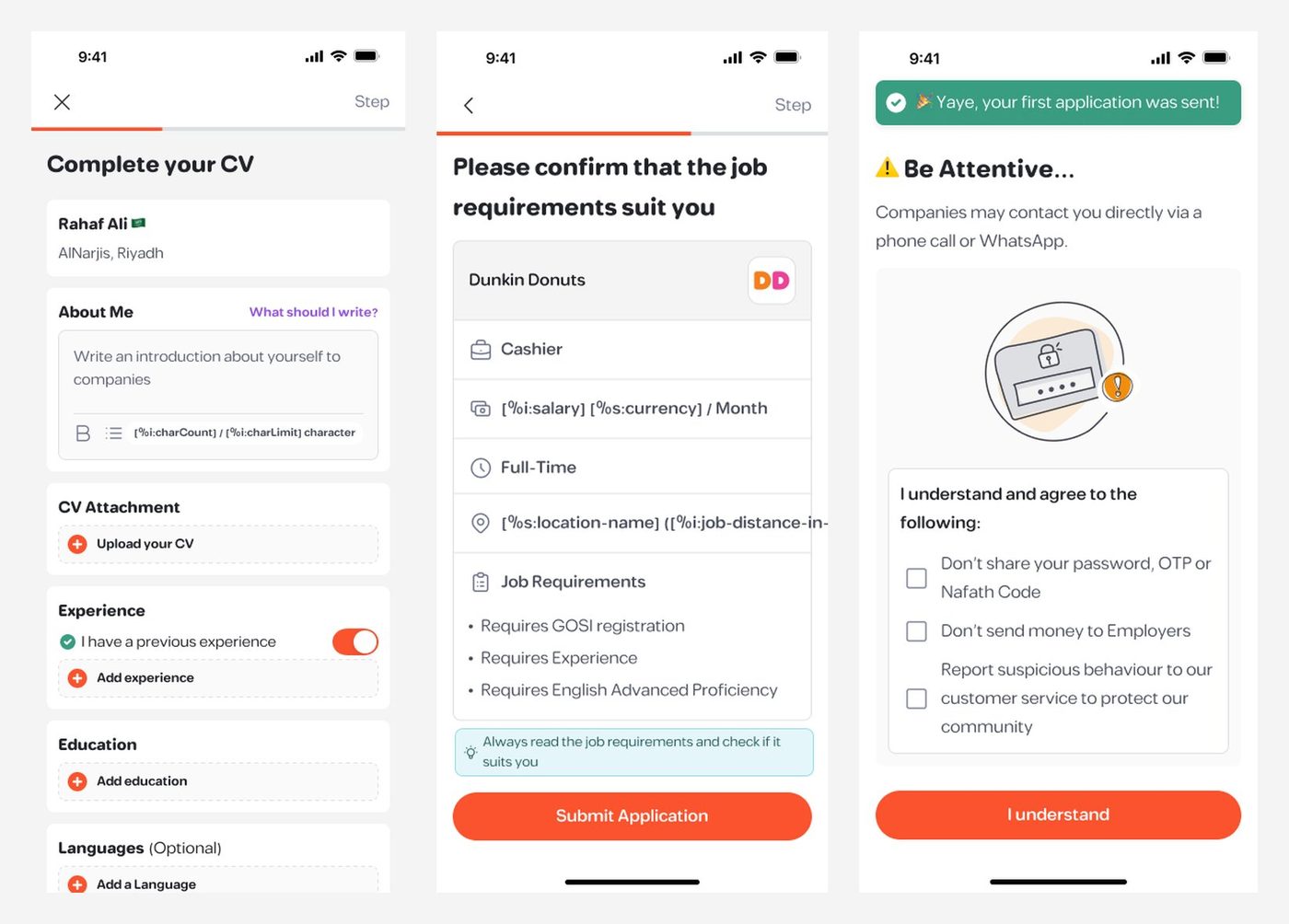
The safety page after your first application
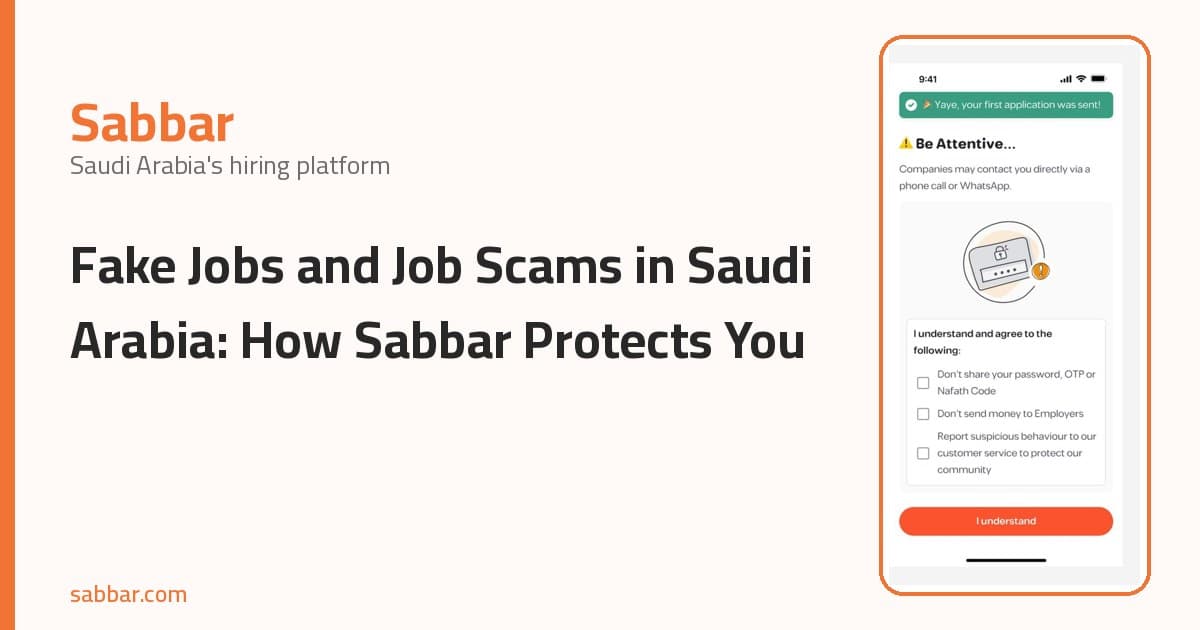
After your first application, a "Be Attentive" page shows three rules: do not share passwords or codes, do not send money to employers, and report suspicious behaviour.
A reminder inside chat
In your chat with any company a reminder appears: be attentive when dealing directly with companies, and do not share any sensitive information.
Contact details hidden from posts
Phone numbers, emails and links are hidden from the text of Sabbar job posts, so contact happens through in-app chat.
Privacy for your data
Your photo and video are visible to verified employers only. Your shared CV shows your city but not your district, and your birth year only.
How do you report a suspicious job on Sabbar?
You report from the job page itself in four steps.
- Open the suspicious post.
- Choose "Report".
- Pick the reason: it's scam or fraud, it's offensive or inappropriate, it's an advertisement or fake, or other.
- Submit the report for Sabbar's team to review.
You can also contact support from Settings through "Contact us" and attach screenshots of the conversation.
What about posts tagged "Job Ad"?
Posts tagged "Job Ad" were published outside Sabbar; the app shows them so you get alerts and can send your CV easily. You apply with the advertiser, on their website, by WhatsApp or by email.
Apply the same rules: check who the advertiser is, do not pay, and do not share sensitive data.
What should you do if you were scammed?
If you were scammed, act fast; time matters.
- Contact your bank immediately: to block the card or transaction if you shared financial details.
- Keep the evidence: screenshots, numbers, accounts and receipts.
- Report to the authorities: through the official reporting channels.
- Report to the platform: where the ad appeared.
- Do not contact the scammer again: and never pay a "refund fee".
How do you check an employer before sending documents?
- Look up the company name and its official website.
- Check the email is on the company's domain, not a free mailbox.
- Ask about the contract type and its documentation on Qiwa.
- Ask for an interview at the company's premises or through an official channel.
- Do not send your ID or IBAN before a written job offer.
More on trust in Is Sabbar legit?, and on choosing platforms in Best job sites and apps in Saudi Arabia.
One CV, reviewed employers and one-tap reporting. Download the Sabbar app and look for your job safely.
Illustrative examples: scam messages and how to read them
These illustrate wording that keeps appearing in scam messages. Reading them once helps you recognise them quickly later.
- "Congratulations, you are accepted! Pay SAR 150 to open your employment file": no interview happened and nobody asked about your experience. The only request is money. A clear scam.
- "Work from home, two hours a day, SAR 12,000 salary, no experience": three warning signs in one sentence: little effort, high pay and no conditions.
- "Send the code you received to confirm your Sabbar account": Sabbar never asks anyone for the verification code. It is typed into the app only.
- "We register you in GOSI on a monthly salary while you stay home": fake Saudization. It is illegal and puts liability on you.
- "Receive the transfer, pass it on, and keep a commission": this uses your account to move money and can expose you to legal action.
One rule covers them all: a real job asks about your experience first, and a scam asks about your money or your data first.
Ready replies that settle the matter
You do not need a long discussion with someone you doubt. One clear question exposes most cases.
- Ask about the business: "What is the company's legal name and Commercial Registration number?"
- Ask about the interview: "When and where is the interview at the company's office?"
- Refuse payment clearly: "I do not pay any fee to be hired."
- Refuse to share the code: "A verification code is not shared with anyone."
- End the chat and report: if they avoid the answer or rush you, stop and use the report option.
A real employer answers these questions without irritation. A scammer changes the subject or pressures you on time.
Groups targeted most, and how they protect themselves
Scammers pick whoever is most in a hurry for a job.
- Fresh graduates: little experience of the job market makes unrealistic offers believable. Rule: no job without an interview.
- People looking for remote work: most "paid task" ads target them. Rule: never pay to start working.
- People looking for extra income: commission-on-transfers offers target them. Rule: your bank account is yours alone.
- People who have been searching for a long time: frustration pushes them to accept anything. Rule: verify the employer however long you have waited.
Habits that protect you in every job search
Protection is not one step. It is a set of fixed habits you apply on any platform.
- Apply inside the platform: applying and chatting inside Sabbar keeps a record of what happened.
- Do not move to a personal account at the first message.
- Send no documents before a clear offer: ID and IBAN are requested after acceptance, by an employer you can identify.
- Look the company up: in the Commercial Registration records and on a map.
- Tell someone you trust: a second opinion from a relative or friend spots what you miss when you are excited.
- Report even if you were not harmed: your report protects the next person.
How to help others
Many victims of job scams are too embarrassed to talk, so others fall into the same trap.
- Warn people around you: send the warning signs to siblings and friends who are job hunting.
- Do not forward unknown ads: in groups without checking the source.
- Report the post on the platform where it appeared.
If you are searching now, start somewhere that reviews employers, and read Is Sabbar Legit?.
Look for your job safely on Sabbar
Sabbar reviews employers before their jobs go live, reminds you of the safety rules, and lets you report any post. Join more than 1.5 million job seekers who apply for free, with no fees at all.
Summary
Job scams show themselves through requests for money, urgency and a vague employer. The fixed rule: never pay, and never share a code or bank details. Sabbar reviews employers, shows safety reminders and lets you report straight from the job page.
FAQs about fake jobs and job scams
Does Sabbar charge job seekers?
No. Sabbar is completely free for job seekers and asks for no fees.
Would a real employer ask for a training fee?
No. Any request for money before hiring is a clear warning sign.
How do I report a job on Sabbar?
On the job page, choose "Report" and select the reason.
Has Sabbar reviewed posts tagged "Job Ad"?
Those jobs were posted outside Sabbar and you apply with the advertiser, so check them yourself.
What if I shared a verification code?
Contact the relevant party at once, such as your bank, change your details and report through official channels.