Writing a new CV for every job is tiring, and sending a Word file from your phone is worse. On Sabbar you create your CV once inside the app and use it to apply for any job in Saudi Arabia with a tap.
This article explains the one-CV idea, walks through each section until your CV is complete, and shares tips that make employers stop and read.
What you will learn
- Why one CV on Sabbar is enough for every job.
- The CV sections in the app and what to write in each.
- The steps to create your CV from your phone.
- Common mistakes that lower your chances and how to avoid them.
What does it mean to create a CV on Sabbar?
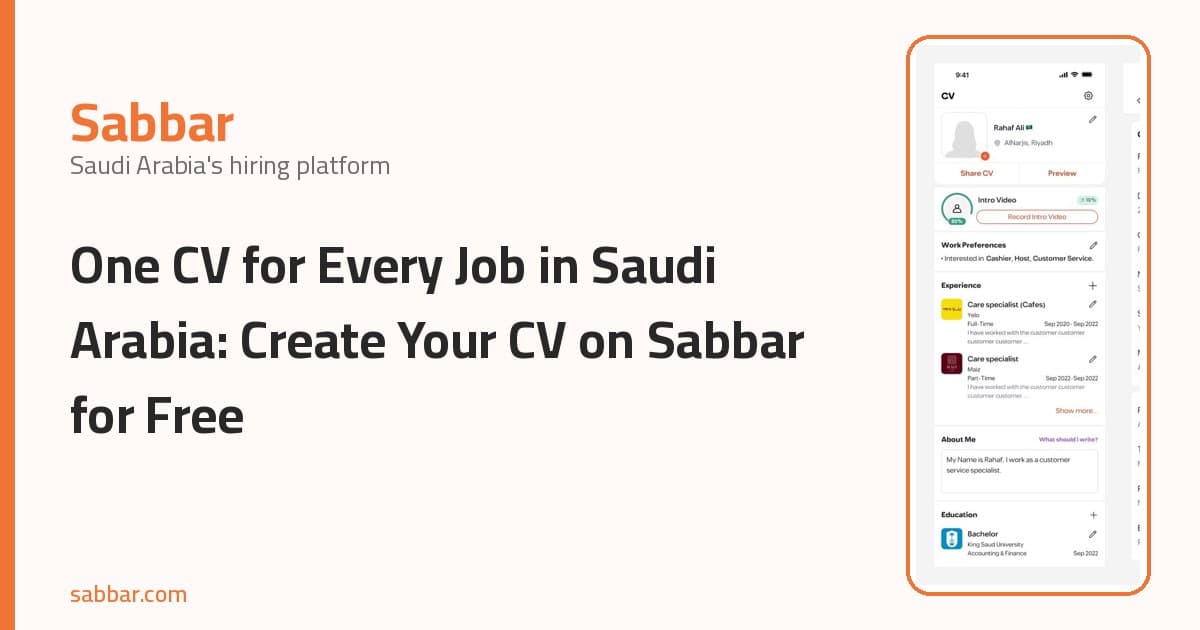
To create a CV on Sabbar is to fill in your profile inside the app, because that profile is the CV employers see with every application. There is no separate file to upload each time.
The CV is free, saved to your account, and can be shared outside Sabbar as a link or a PDF, in Arabic or English. The full overview of the app is in the Sabbar job app guide.
Why is one CV better than a file per job?
One CV is better because it saves time and is always up to date. The main benefits:
- Fast applications: you apply in a few taps because your details are ready.
- Update once: add a new job and it shows in every future application.
- Stable formatting: no broken fonts or files that will not open for the employer.
- Better matching: structured details help you get recommended for suitable jobs.
What are the CV sections in the Sabbar app?
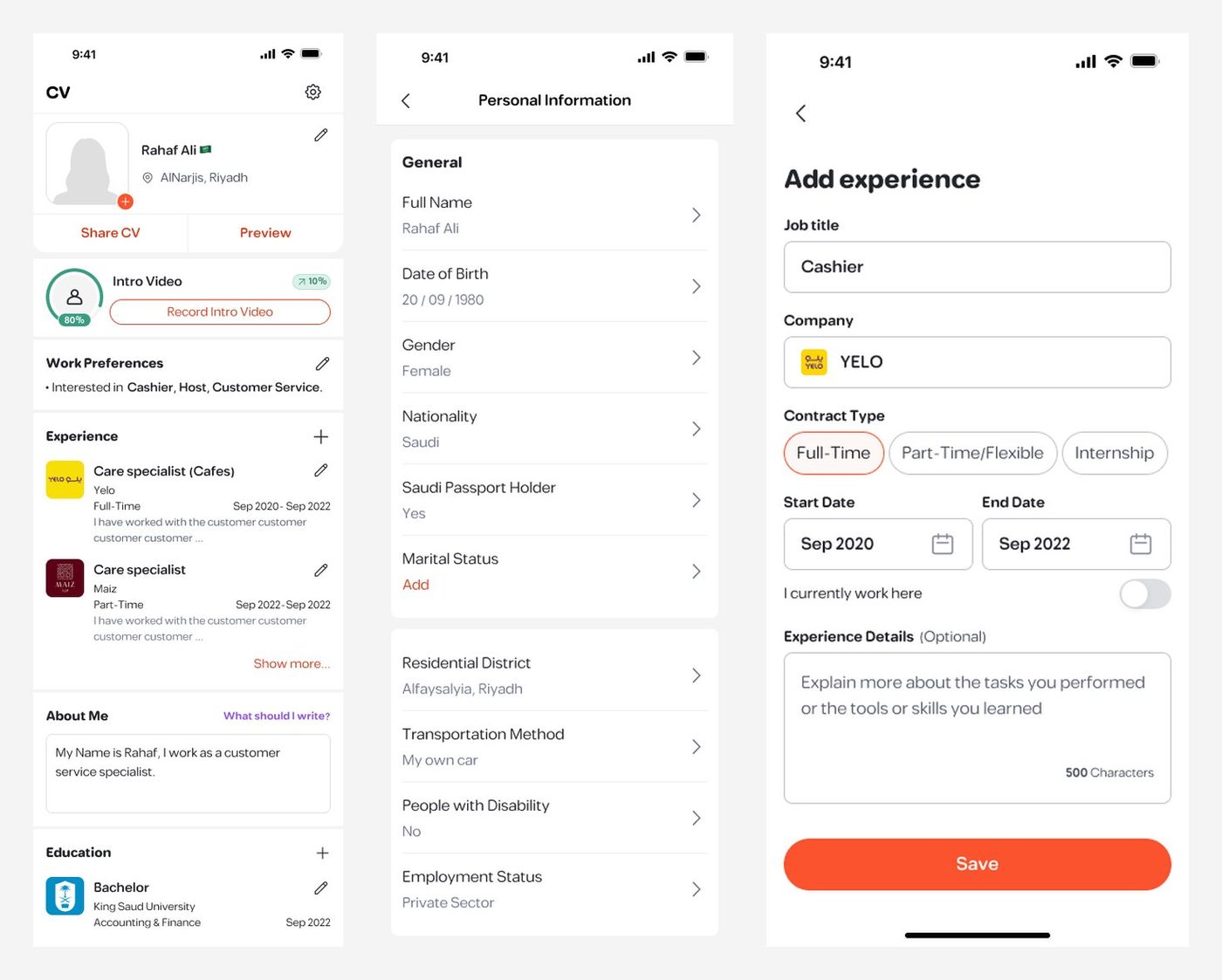
The CV tab has clear sections, and each one answers a question employers ask.
Personal Information
Personal Information covers name, date of birth, gender, nationality, marital status, residential district, transportation and employment status. District matters because employers prefer people who live near the workplace.
Work Preferences
Work Preferences set the contract type you want and your categories and titles. These preferences shape the jobs you see.
Experience
Experience is any previous work, even seasonal or part-time. Add the title, employer, duration and a short description of duties.
About Me and Education
About Me is a short paragraph of two or three lines. Education covers your qualification, institution and graduation year.
Skills, Languages, Training and Certificates
Skills come with ready suggestions based on your experience. You also add languages and levels, training courses, and licences and certificates.
CV Attachments, photo and video
You can attach a CV file as a PDF or image, and add a profile photo and a short introductory video. Photo and video are optional, and only verified employers can see them.
Every one of these sections can be filled in from your phone in one sitting. Download the Sabbar app, start your CV now, and edit it whenever you like at no cost.

Sabbar is Saudi Arabia's leading local hiring platform
The go-to place for job seekers and employers across every sector in the Kingdom, with more than 1.5 million job seekers and thousands of companies
Get started with Sabbar today!
Steps to create your CV on Sabbar from your phone
You create your CV on Sabbar in seven ordered steps.
- Sign up with your mobile number and answer the sign-up questions.
- Open the CV tab in the bottom bar.
- Complete Personal Information and set your district.
- Add your experience from newest to oldest.
- Write About Me and add your education.
- Choose skills from the suggestions and add languages.
- Tap Preview to see the CV as an employer would.
If sign-up is new to you, read How to sign up for Sabbar with your Saudi mobile number.
What do you write if you have no experience?
If you have no experience, write what shows your commitment and skills instead of leaving the section empty.
- Co-op or summer training.
- Volunteering and event work.
- Study and graduation projects.
- Courses and certificates.
- Measurable skills such as typing speed or specific software.
Many jobs on Sabbar do not require experience, and search has a "No experience" filter.
Common mistakes that lower your chances
These mistakes come up again and again, and they are easy to avoid.
- A vague About Me: "an ambitious person seeking an opportunity" says nothing. Name your field and experience.
- Experience without duties: write what you actually did, in two lines.
- Too many unrelated skills: choose the ones that serve the jobs you want.
- No district: it keeps you out of nearby job results.
- Sensitive data in the attachment: never upload a file showing your ID number or private details.
CV complete? Do not wait for employers to find you. Browse jobs in Saudi Arabia on Sabbar and apply today.
How do you know your CV is working?
You can tell from the Applications tab, which shows a CV visibility gauge, Low, Medium or High, along with how many times employers viewed it.
If visibility is low, the app suggests free tasks that raise it: attaching a CV file, adding a profile photo, and recording an introductory video. And if you are still unsure about the platform, see Is Sabbar legit?.
Examples: how to write your duties in the Experience section
What separates one CV from another is how the duties are written. The rule: a clear verb, what you did, and on which system or at what scale. Compare the two versions.
- Cashier, weak: "Worked on the till and customer service."
- Cashier, strong: "Took orders and collected cash and card payments on the point-of-sale system, and closed and reconciled the till at the end of every shift."
- Barista, weak: "Made coffee."
- Barista, strong: "Prepared espresso and specialty coffee drinks to the shop's standards, cleaned the machines daily, and trained new staff on the drinks menu."
- Sales associate, weak: "Sold products."
- Sales associate, strong: "Welcomed showroom customers and explained products, met the monthly sales target, and handled display layout and weekly stock counts."
Write two to four duties for each job. Real numbers, such as customers per day or team size, strengthen the CV when you know them.
How to write "About Me" in three lines
A good summary answers three questions in order: who you are professionally, what you are good at, and what you are looking for.
- Line one: your title or field and years of experience, or your qualification if you are a fresh graduate.
- Line two: your two or three strongest skills for the jobs you are targeting.
- Line three: the type of job, city and working hours you want.
With experience: "Customer service agent with three years in retail. Strong at handling complaints and working on point-of-sale systems, with good English. Looking for a full-time role in Jeddah."
Fresh graduate: "Business administration graduate from a Saudi university. Built teamwork and reporting skills during co-op training. Looking for a first administrative role in Riyadh."
How to choose skills for the job you want
The skills you pick should match what job posts in your field ask for, not everything you know. Here are examples by field.
- Restaurants and cafés: drink preparation, food safety, working under pressure, point of sale.
- Retail and sales: persuasion, customer service, merchandising, stock counts.
- Customer service: phone communication, complaint handling, fast typing, CRM systems.
- Administrative roles: Office software, reporting, scheduling, correspondence.
Start with the suggestions the app offers, because they are worded the way employers search.
A checklist before your first application
Before you tap Apply for the first time, open the preview and check these points.
- Your name is complete and spelled correctly.
- Your district and city are correct.
- Every job has a title, employer, period and duties.
- The summary is three specific lines.
- At least five skills related to your field.
- Languages and your level in each are added.
- The profile photo is clear and work-appropriate, if you added one.
- The mobile number is one you actually answer.
Create your CV on Sabbar for free and use it for every job
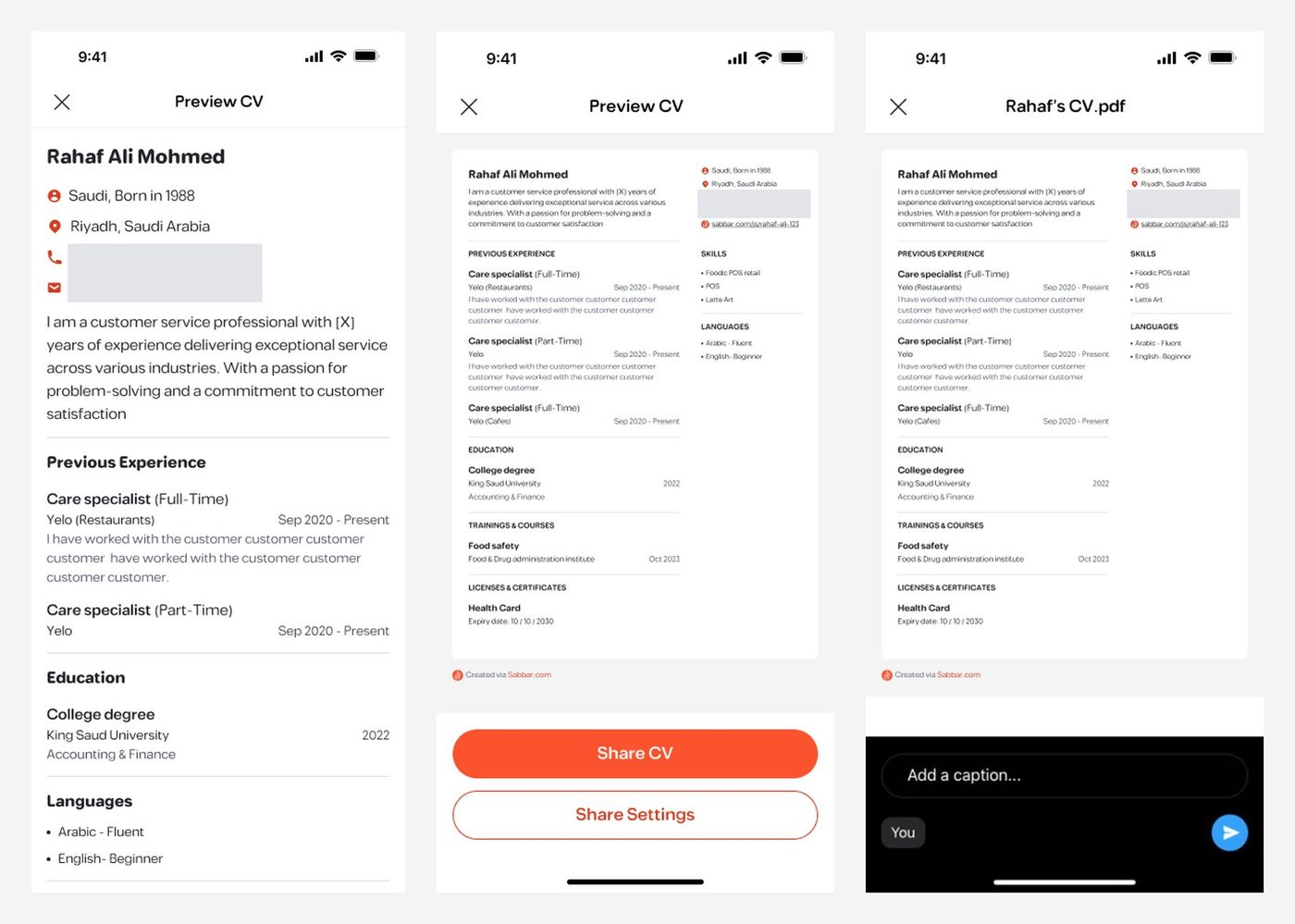
One CV built on your phone and used with more than 12,000 companies in Saudi Arabia. Add your experience and skills, share it as a link or PDF, and see which employers viewed it.
Summary
You create your CV on Sabbar once, on your phone, for free. Fill the sections carefully, check the preview, then apply with the same CV to every job that suits you in Saudi Arabia.
FAQs about creating a CV on Sabbar
Is creating a CV on Sabbar free?
Yes. Creating, editing and sharing the CV is completely free.
Can I download my CV as a PDF?
Yes. You can share your CV as a PDF or a web link and choose Arabic or English.
Do I need a different CV for each job?
No. Your Sabbar CV is one CV used for every application, and you can update it at any time.
Is a profile photo required?
No. Photo and video are optional, though they raise your CV's visibility, and only verified employers see them.
Can I upload the CV I already have?
Yes. Upload it as a PDF or image attachment, as long as it is current and free of ID numbers and sensitive data.