Applied to many jobs and the status still says "Your CV wasn't viewed"? The problem is usually not you. It is your CV visibility. An employer sees dozens of applicants and opens the complete profiles first, the ones that give a clear picture of the person.
Sabbar has a gauge that measures your CV visibility and three free tasks that raise it. This article goes through each one, with tips that complete the picture.
What you will learn
- What the CV visibility gauge is and where to find it.
- The three free tasks that raise it.
- Photo and video guidelines so they are not returned.
- Other factors that make employers open your profile.
What is CV visibility on Sabbar?
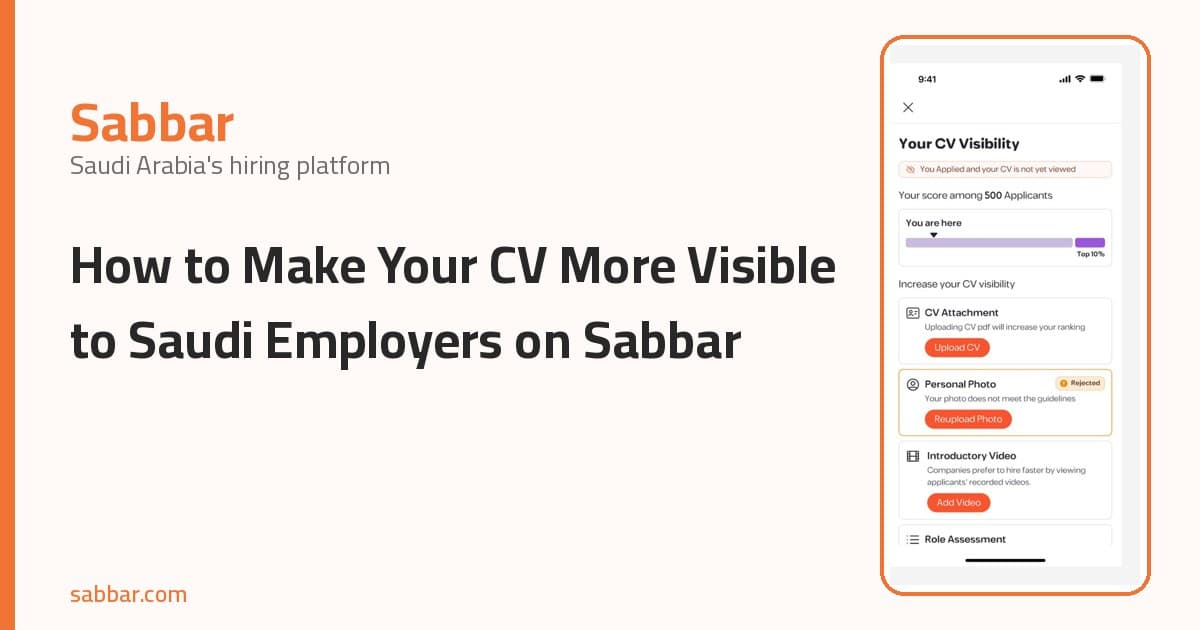
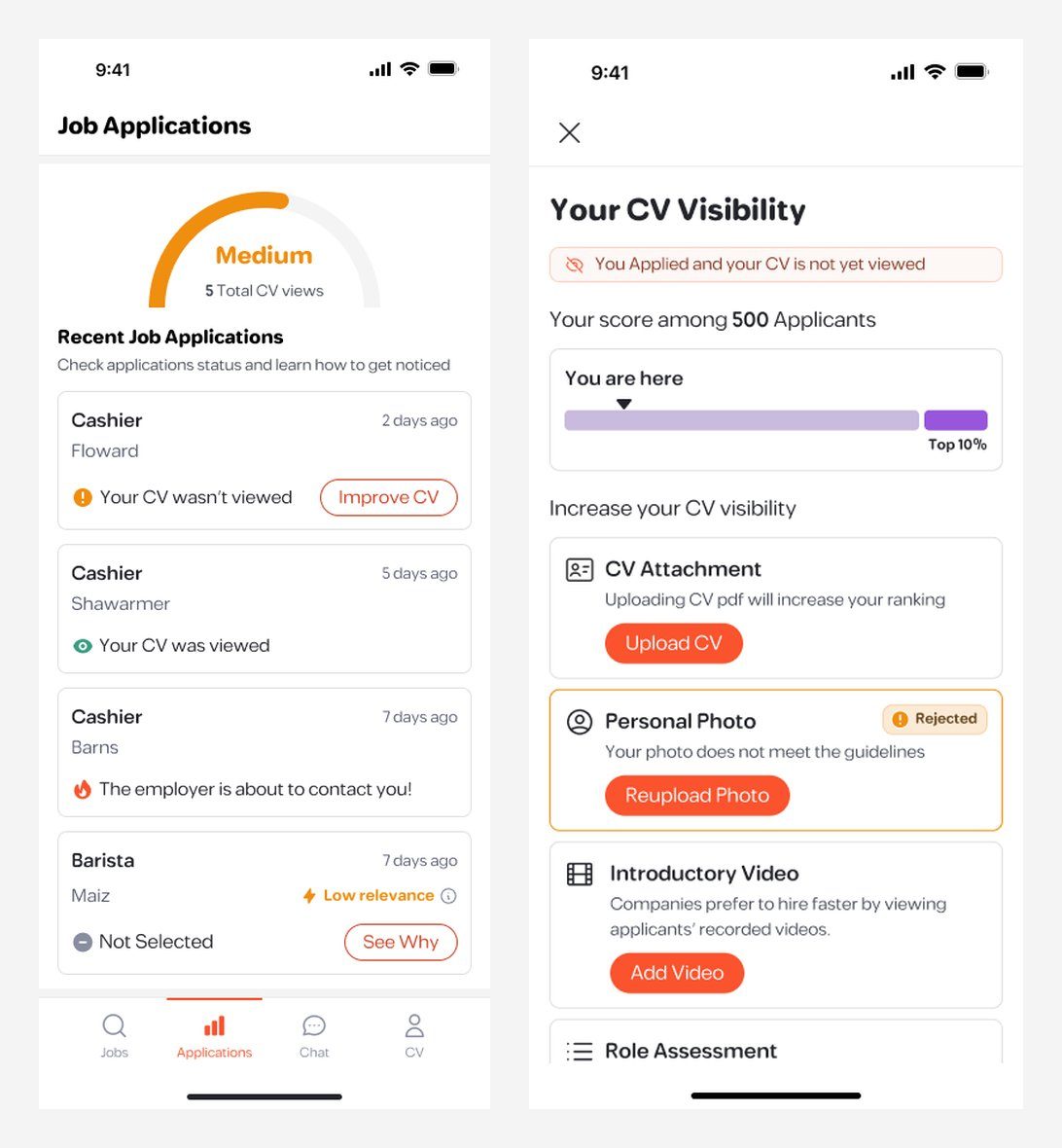
CV visibility is a measure of how much your profile stands out to employers compared with other applicants. It sits at the top of the Applications tab as a gauge with three levels, Low, Medium and High, along with your CV view count.
The more complete your profile, the higher the gauge. The statuses shown with each application are explained in Job application status on Sabbar.
Why does CV visibility matter?
It matters because a recruiter has no time to open every profile.
- A complete profile signals a serious applicant.
- A photo and video save the employer part of the interview.
- An attached CV helps anyone who wants the details.
- Structured data helps you get suggested for more jobs.
What are the three free tasks that raise visibility?
There are three, found by tapping "Improve CV" in the Applications tab.
Task one: attach your CV file
The CV Attachment is a PDF or image of your existing CV, added to your Sabbar profile. The upload rules are clear:
- An up-to-date file reflecting your latest experience.
- No ID number or sensitive data.
- Clear and readable.
Task two: add a profile photo
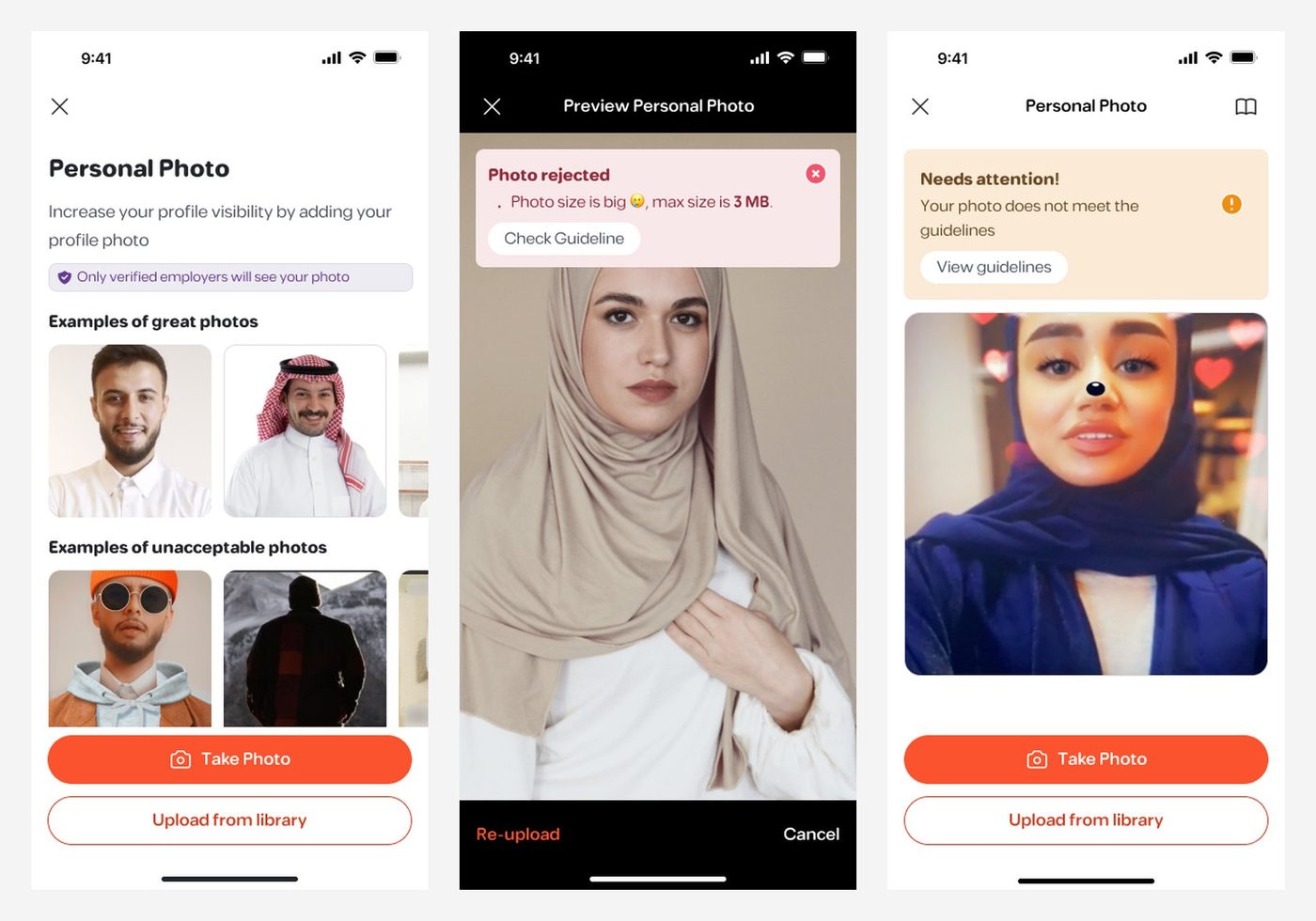
The profile photo appears at the top of your profile and is visible to verified employers only. Take it with the camera or upload from your library; Sabbar reviews it against clear guidelines.
Task three: record an introductory video
The introductory video is a short clip in which you introduce yourself. Only verified employers can watch it, and Sabbar reviews it. Record it directly or upload it.
The three tasks take under fifteen minutes. Download the Sabbar app, open the Applications tab, tap "Improve CV" and start with the easiest.

Sabbar is Saudi Arabia's leading local hiring platform
The go-to place for job seekers and employers across every sector in the Kingdom, with more than 1.5 million job seekers and thousands of companies
Get started with Sabbar today!
What are the profile photo guidelines?
An accepted photo is a clear, professional picture of your face. The app shows examples of great and unacceptable photos before you upload.
- Good lighting and a simple background.
- A clear face looking at the camera.
- A tidy look suited to a workplace.
- You alone; not a group photo or a screenshot.
If the photo does not meet the guidelines it is returned with the reason, and a "Requires Your Attention" card appears so you can fix it. Upload runs in the background while you keep using the app.
What are the introductory video guidelines?
A good video is short and clear and answers three questions: who are you, what is your experience, and what are your skills?
- No filters.
- A clear face: a mask or niqab is allowed.
- Good light and no noise.
- Suggested topics: introduce yourself, your experience, skills or education.
The video is optional and you can delete it at any time. The app says it plainly: you own your data, and your decision is respected.
What else makes employers open your profile?
Beyond the three tasks, six factors affect your visibility and chances.
- Experience written with duties: not the title alone.
- Skills tied to the job: choose from the suggestions.
- A specific About Me: two lines on your field and strengths.
- Your district: proximity is part of matching.
- Applying early: early applicants get viewed more.
- Your activity: active job seekers show up in employers' recommendations.
The sections themselves are covered in One CV for every job in Saudi Arabia.
How do you know visibility has improved?
You can tell from three signals in the app.
- The gauge moves from Low to Medium or High.
- Your CV view count rises.
- Application statuses change to "Your CV was viewed".
You also get a notification whenever a company views or unlocks your CV.
Mistakes that lower your CV visibility
- A group photo or one cropped from an event.
- A video with poor sound or a noisy background.
- An old attachment that does not match your details in the app.
- Experience with no dates or duties.
- An empty skills section.
Profile ready? Test it. Apply to new jobs on Sabbar and see how many employers view your CV this week.
Are your photo and video safe?
Yes. Your photo and video are shown to verified employers only, not to the public. When you share your CV outside Sabbar as a link or PDF, it shows your city but not your district, and your birth year only.
A ready script for a thirty-second intro video
What stops most job seekers from recording a video is not knowing what to say. Use this four-sentence template and change what is in brackets.
- Introduction: "Hello, I am (name), and I live in (district and city)."
- Experience: "I worked for (period) as a (title) at a (type of business), responsible for (two main duties)."
- Skills: "I am good at (first skill) and (second skill), and my English is (level)."
- What you want: "I am looking for a (working pattern) job in (field), and I can start (date)."
If you are a fresh graduate, replace experience with your major, training and any volunteering. Write the script down, read it aloud twice, then record without looking at the paper. The second or third take is usually better.
An illustrative example: a profile before and after improvement
This is an illustration of a job seeker in Taif looking for customer service work.
Before: a name and mobile number, one job listed by title only, no summary, no skills, no photo or video. He applies to many jobs and his applications stay unviewed.
After one hour of work:
- Three real duties added to each job, with clear verbs.
- A three-line summary on his field, strengths and goal.
- Six skills chosen from the app's suggestions.
- An updated CV file attached as a PDF.
- A clear profile photo that follows the guidelines.
- A half-minute intro video.
His experience did not change, but what employers see did. The first profile raises questions, and the second answers them.
Mistakes that send a photo or video back for editing
Sabbar's team reviews photos and videos so your profile looks professional. These mistakes cause most returns.
- A group photo, or a crop from one.
- A screenshot, or a photo of a printed photo.
- Filters and effects that change how your face looks.
- Poor lighting that hides your face.
- Background noise from a television or the street.
- A video that is not about work: this is a professional introduction, not a personal clip.
If a photo or video is returned, do not leave it. The "Requires your attention" card stays until you fix it, and fixing takes minutes.
A ten-minute weekly plan to keep your visibility
Raising visibility is not a one-off task. An updated profile stays near the front.
- Review your summary: does it still reflect your current goal?
- Add anything new: a course, a certificate, a new duty in your current job.
- Update employment status and expected salary if they changed.
- Check Work Preferences: categories, titles and location.
- Look at the indicator: if a new task appears under "Improve your CV", do it.
Is high visibility enough on its own?
No. Visibility opens the door but does not carry you through it. Once an employer opens your profile, three other things take over.
- Matching: your experience, location and expected salary against the job's requirements.
- Speed of reply: to messages and interview invitations.
- The interview: specific, honest answers.
So combine a strong profile with a smart choice of jobs to apply for.
Raise your CV visibility today and apply with confidence
Three free tasks move your CV from the bottom of the list to the top: a CV attachment, a photo and an introductory video. Download the app, complete them, and let more than 12,000 companies see the best version of you.
Summary
CV visibility on Sabbar rises with three free tasks: attaching a CV file, adding a profile photo and recording an introductory video. Add well-written experience and skills and early applications, and you will see your statuses change.
FAQs about CV visibility on Sabbar
Are the visibility tasks free?
Yes. All three are completely free.
Who sees my photo and video?
Verified employers only.
What if my photo is rejected?
It is returned with the reason, and you can upload another that meets the guidelines.
Is the introductory video required?
No. It is optional and you can delete it at any time.
Is high visibility enough to get a job?
It increases how many people see your profile, but the decision depends on your fit and your interview.