Job Application Status on Sabbar: What Each Status Means When You Apply in Saudi Arabia 2027


You submitted your application and the waiting began. Did it arrive? Did the employer open it? Were you rejected? On most hiring channels you never find out. On Sabbar you follow your job application status in real time in the Applications tab, and each status tells you what happened and what to do next.
This article explains what each status means, what to do about it, and how to read your CV visibility gauge.
What you will learn
- Where to find your application statuses in the app.
- What each of the five statuses means.
- The right move for each status.
- How to raise your CV visibility so statuses improve.
What is job application status on Sabbar?
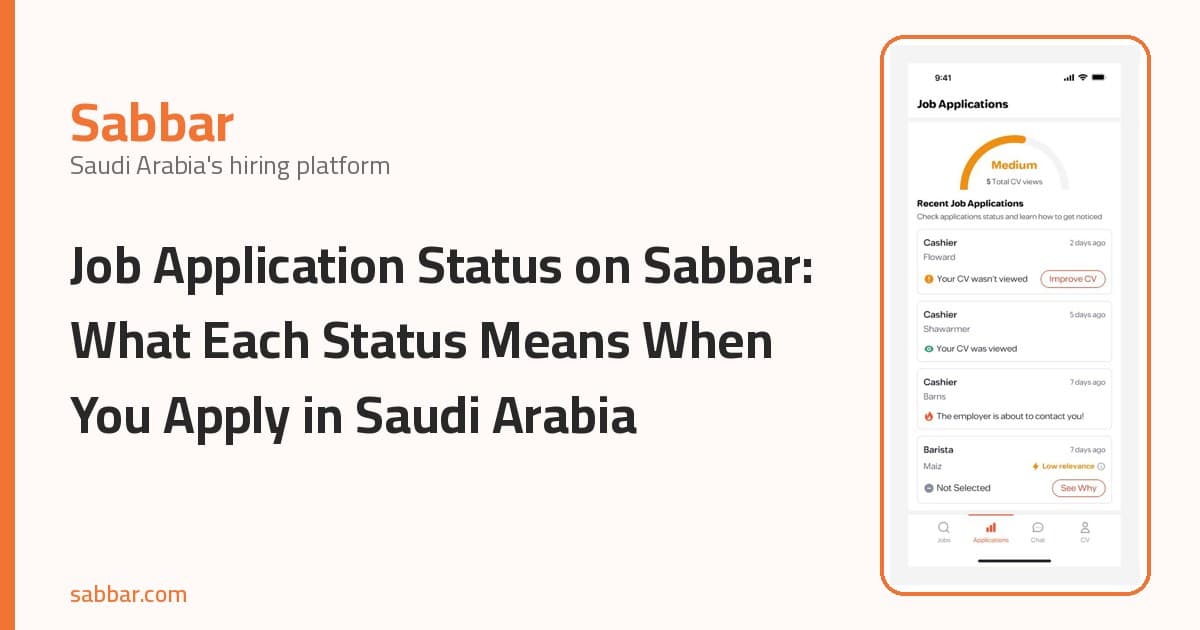
Job application status is a short phrase shown with every application you sent, saying where it stands with the employer. You find it in the Applications tab, the second tab in the app's bottom bar.
Each application carries one status at a time, and it changes automatically when the employer acts. You also get notifications for the important changes. Applying itself is covered in How to apply for a job on Sabbar.
What does each status mean?
The Applications tab has five main statuses.
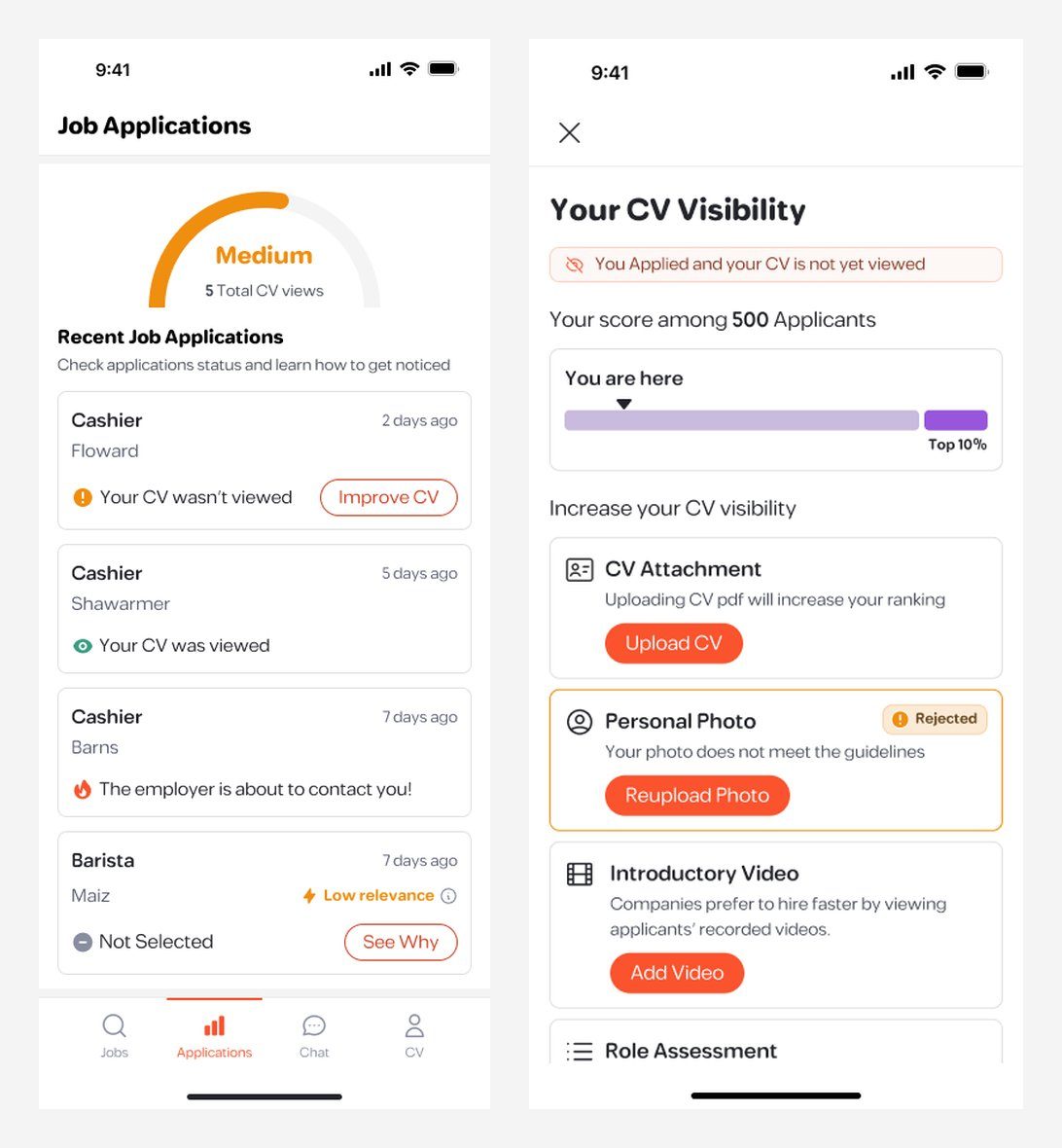
"Your CV wasn't viewed"
The employer has not opened your profile yet. This is not a rejection. The post may be new, or there may be many applicants. It comes with an "Improve CV" prompt that leads to tasks which raise your visibility.
"Your CV was viewed"
The employer opened and read your profile. A good sign: your application arrived and was seen. You get a notification that the company viewed your CV.
"The employer is about to contact you!"
The employer is interested and getting ready to reach out. This is the strongest status before a conversation. Be ready for a message or a call.
A Saud interview invitation
The employer wants you to take a short first interview with Saud, the AI assistant. You accept and answer by text or voice.
"Not Selected"
The employer decided not to continue with you for this job. It comes with a "See Why" option.
Not applied to enough jobs yet? Browse open jobs on Sabbar and apply to those that match your experience and district.

Sabbar is Saudi Arabia's leading local hiring platform
The go-to place for job seekers and employers across every sector in the Kingdom, with more than 1.5 million job seekers and thousands of companies
Get started with Sabbar today!
What should you do for each status?
Each status has a move that raises your chances. A quick guide:
- CV wasn't viewed: tap "Improve CV", do the suggested tasks, and keep applying elsewhere.
- CV was viewed: make sure notifications are on and give your CV one last check.
- About to contact you: keep your phone close and reply quickly and professionally.
- Interview invitation: accept early and read Saud AI interview: how to prepare.
- Not Selected: read the reason and adjust your CV or the jobs you choose.
What is the CV visibility gauge?
The CV visibility gauge sits at the top of the Applications tab and shows how visible your CV is to employers. It has three levels, Low, Medium and High, along with your total CV views.
The gauge compares your profile with other applicants. A complete CV with a photo and video shows up more than one with a name only.
How do you raise your CV visibility?
Raise it with three free tasks the app suggests under "Improve CV".
- Attach a CV file: an up-to-date PDF or image, with no ID number or sensitive data.
- Add a profile photo: following the guidelines; Sabbar reviews it and returns it with a reason if it does not pass.
- Record an introductory video: a short one about you and your experience.
Only verified employers can see your photo and video. Fill in experience and skills too; see One CV for every job in Saudi Arabia.
Why are applicants not selected? Common reasons
Not being selected does not mean you are unqualified in general; it means this job was not a match. The most common reasons:
- Distance between your home and the workplace.
- Less experience than required, or in a different field.
- Expected salary above the offer.
- Not available for the required shift.
- The openings were filled before your application was reached.
The practical fix: apply to jobs closer to your experience and home, and apply early.
Do "Job Ad" posts work the same way?
No. Posts tagged "Job Ad" were published outside Sabbar, and you apply on the company's website, by WhatsApp or by email. Follow-up for those happens with the advertiser directly.
Start raising your visibility today. Download the Sabbar app, add your photo and introductory video, and watch your gauge climb.
Tips to reach "about to contact you"
- Apply within the first day of the post.
- Choose jobs tagged "Nearby".
- Write a specific About Me on your field and experience.
- Answer the application questions precisely.
- Turn on job alerts so you hear about new jobs first.
An illustrative example: one application from applying to being contacted
This illustrates the sequence of statuses. Timings are for explanation only, because they differ from one employer to another. A job seeker in Dammam applies for a receptionist role at a clinic.
- Right after applying: the application appears in the Applications tab as "CV not viewed".
- Later: the status changes to "CV viewed", and she receives a notification.
- Next: an interview invitation from Saud arrives in the clinic's name. She accepts and answers the questions that evening.
- Then: the status changes to "Employer is about to contact you".
- Finally: a message from the clinic arrives in chat with a time for an in-person interview.
Had it ended at "Not selected", she would open "Know why" and use the reason to adjust her CV or her choice of jobs.
How long should you wait before acting?
No single waiting time fits every employer, but waiting without doing anything is not a plan. Use this practical rule.
- In the first days: do nothing except make sure your CV is complete and notifications are on.
- If it stays "CV not viewed" for a week: complete the CV visibility tasks and apply to newer jobs.
- If the CV was viewed and nothing followed: review your summary and experience. The employer opened your profile and did not find enough.
- In every case: keep applying elsewhere. Do not pin your search on one application.
How to turn "Not selected" into a useful step
Not being selected is information, not a verdict on you. Use it this way.
- Read the reason: through "Know why" on the application.
- Classify it: is it something you can change, such as an incomplete CV or a high expected salary, or something fixed, such as distance?
- Change what you can: complete your experience, add skills, and review your expected salary.
- Change your choices if the reason is fixed: apply to jobs that are closer or match your experience better.
- Watch for repetition: if the same reason appears in three applications, that is the first thing to fix.
A simple log for tracking your applications
The Applications tab shows the statuses, but a small log of your own reveals the pattern. Note four things for each application.
- The job title and district.
- The date you applied, and whether it was the first day the job was posted.
- The last status it reached.
- The reason for not being selected, if any.
After ten applications you will know where most of them stop: before being viewed, after being viewed, or after the interview. Each stopping point has a different fix.
Mistakes in reading application status
- Treating "CV not viewed" as rejection: the employer may not have started reviewing yet.
- Reapplying at random: improve the CV first, then apply to new jobs.
- Ignoring an interview invitation: it expires, and postponing costs you the chance.
- Turning off notifications: you miss the employer's message or a status change.
- Not reading the reason: it is the easiest information you can get to improve your next applications.
Apply and follow every application from your phone
On Sabbar your application does not vanish. You know when your CV was viewed, when the employer is about to reach out, and what raises your visibility. Download the app and send an application you can track.
Summary
Job application status on Sabbar tells you what happened to your application: not viewed, viewed, about to be contacted, invited to interview, or not selected. Read the status, make the right move, and raise your CV visibility with the free tasks.
FAQs about application status on Sabbar
Does "Your CV wasn't viewed" mean I was rejected?
No. It only means the employer has not opened your profile yet.
How do I find out why I was not selected?
Tap "See Why" on the application marked "Not Selected".
Will I be notified when my CV is viewed?
Yes. You get a notification that the company viewed your CV, if notifications are on.
Can I apply again after not being selected?
You can apply to other jobs at the same company or elsewhere after improving your CV.
Does high CV visibility guarantee a job?
It does not, but it increases how many employers see your profile, which is the first step.