A new notification on your phone: a company invited you. You never applied there, but they found your profile and chose you. A job invitation like this is a stronger opening than a normal application, because the employer made the first move.
How do you answer, and what do you write next? This article explains what an invitation means on Sabbar, your three options, and how to turn it into an interview.
What you will learn
- What a job invitation is and why you got one.
- Where to find it in the app.
- When to choose each of the three replies.
- What to write after accepting, and mistakes to avoid.
What is a job invitation on Sabbar?
A job invitation on Sabbar is a message a company sends to a job seeker who has not applied, asking them to discuss a specific job. The company saw your profile among the job seekers matching its job and decided to invite you.
It is different from a Saud interview invitation. A job invitation opens a chat with the company; an interview invitation is a short AI interview after you apply, explained in Saud AI interview: how to prepare.
Why did you get the invitation?
You got it because your profile matched what the company wants. Sabbar recommends job seekers to employers on three factors.
- Your activity: you use the app and are really looking.
- Your experience: you have worked in a similar title.
- Your proximity: you live near the job's location.
In other words, an invitation is proof your CV is working for you.
Where do you find the invitation in the app?
You find it in three places.
- A push notification: "[Company] invited you".
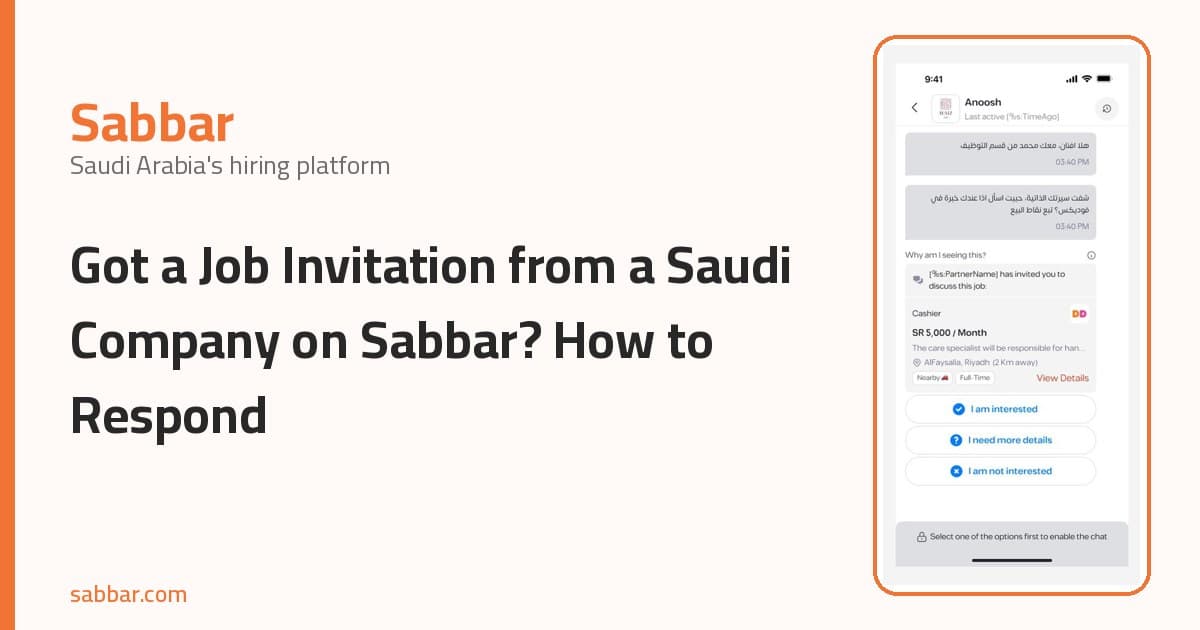
- A card in chat: "[Company] has invited you to discuss this job".
- The Job Invitations section: in the For You feed.
The first time, a short intro screen explains the feature.
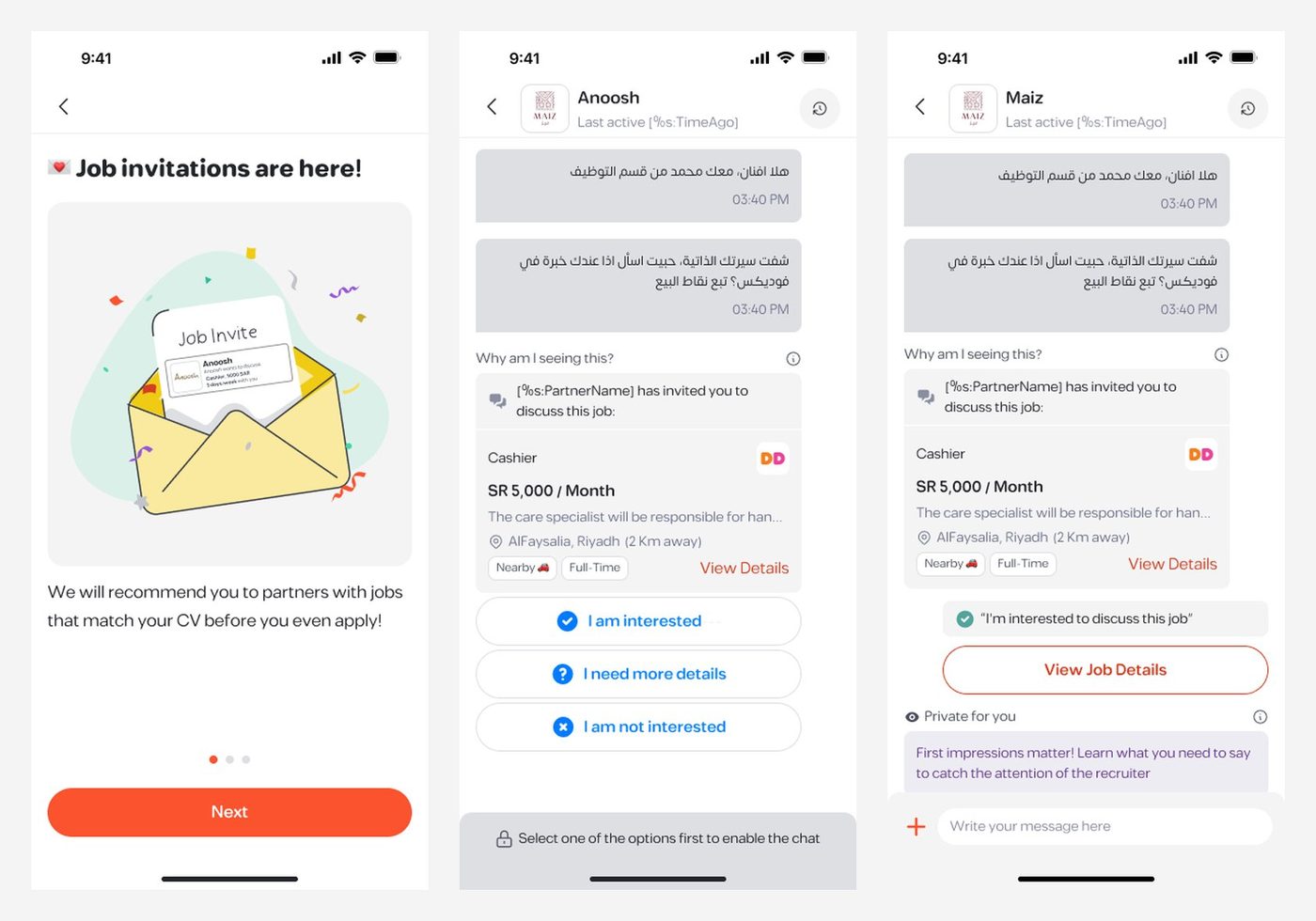
What are the three reply options?
"I am interested"
Choose it if the job suits you at first glance: the title, the location and the contract type. The chat with the company opens straight away.
"I need more details"
Choose it if something essential is missing, such as salary, shifts or the branch location. The company knows you are interested in principle and waits to clarify.
"I am not interested"
Choose it if the job does not suit you. There is nothing wrong with that, and it is better than leaving the invitation unanswered.
Want more invitations? Complete your profile and stay active. Download the Sabbar app and update your CV and preferences today.

Sabbar is Saudi Arabia's leading local hiring platform
The go-to place for job seekers and employers across every sector in the Kingdom, with more than 1.5 million job seekers and thousands of companies
Get started with Sabbar today!
How do you decide which reply to choose?
Read the job card first, then ask yourself four questions.
- Is the title close to my experience or what I want to do?
- Does the location work for me every day?
- Does the contract type fit my time?
- Is the salary stated and acceptable?
Three yeses are enough for "I am interested". If salary or shifts are unclear, choose "I need more details".
What do you write after choosing "I am interested"?
Do not wait for the company to start. Write a short message as soon as the chat opens.
- Greeting and thanks: "Hello, thank you for the invitation."
- A brief introduction: "I'm [name], with [duration] of experience in [field]."
- Availability: "I am free for an interview on [day and time]."
- One question if needed: "Is the shift morning or evening?"
Three lines are enough. The full chat rules are in Chatting with Saudi employers on Sabbar.
What do you ask after choosing "I need more details"?
Ask specific questions, together, in one message.
- What is the salary range and contract type?
- Where exactly is the branch?
- What are the shifts and days off?
- When does the job start?
Do not send each question separately, and do not ask what is already on the job card.
When should you reply to the invitation?
Reply the same day, ideally within hours. The company invites more than one person and starts with whoever answers first.
- Turn on notifications so you do not miss it.
- If you are busy, choose the right reply now and write the details later.
- Do not leave an invitation hanging for days.
Does accepting the invitation mean accepting the job?
No. Accepting only means you are willing to talk. You then discuss, the company may ask for an interview, and each side decides.
You can also withdraw politely at any point if the job turns out not to suit you.
How do you get more invitations?
Get more by keeping your profile complete, current and active.
- Complete your CV: experience, skills and About Me.
- Add a photo and an introductory video: see How to make your CV more visible on Sabbar.
- Update your district: proximity is a core factor.
- Set your Work Preferences: titles and contract type.
- Open the app regularly: active job seekers are recommended more.
- Apply to similar jobs.
Is every invitation safe?
Invitations come from companies with Sabbar accounts, and company accounts are reviewed before their jobs go live. Even so, always follow the safety rules.
- Never pay anything.
- Never share verification codes or bank details.
- Report suspicious behaviour.
Common mistakes when answering invitations
- Ignoring the invitation because you "did not apply there".
- Choosing "I am interested", then never replying in chat.
- Asking about salary in one word, with no greeting.
- Accepting an invitation to a far-away job, then cancelling on interview day.
- Replying a week later.
Do not only wait for invitations. Browse open jobs on Sabbar and apply yourself to what suits you.
An illustrative example: one invitation and three ways to respond
This illustrates how the response changes the outcome. Three job seekers receive the same invitation for a sales associate role at a furniture showroom in Jeddah.
- The first: tapped "I am interested" and wrote nothing. The employer messaged him two days later, and he answered a week after that. The job was filled.
- The second: tapped "I need more details" and wrote: "What is the salary?" The employer answered, and he did not reply. The impression: only interested in the figure.
- The third: tapped "I am interested" and wrote straight away: "Hello, thank you for the invitation. I am Reem, I worked for two years in retail sales, and I live close to the showroom. I am available for an interview on Sunday or Monday afternoon. Is it a single shift or a split shift?"
The third had an interview booked the same day. She was not necessarily the most experienced, but she made the next step easy for the employer.
How to read the invitation card before you respond
The card carries the job details, and reading it in order prevents a hasty response.
- Title: is it what you are looking for, or close to your experience?
- Location: open the map and estimate the journey at the actual working hours.
- Contract type: full time, part time, temporary or internship.
- Salary: if stated, compare it with your expectation. If not, make it your first question.
- The company: open its profile and read the About section and its other jobs.
- Requirements: are you missing a must-have? If so, say it openly in your reply.
Two minutes of reading make your reply specific, and a specific reply sets you apart from the other invitees.
Good questions and questions to save for later
When you choose "I need more details" or after accepting, the kind of questions you ask leaves an impression.
- Good opening questions: what are the hours and shifts? Which branch exactly? What type of contract? When do you need someone to start?
- Fine once you have introduced yourself: what is the salary or its range? Is there a transport allowance or incentives?
- Save for the interview: leave, promotions and medical insurance details.
- Not as your first message: "What is the salary?" alone, with no greeting or introduction.
Put no more than two questions in one message, so each gets a clear answer.
What if several invitations arrive at once?
This happens to active job seekers with complete profiles, and it is a good position if you manage it well.
- Answer everyone the same day: even with a short reply confirming interest.
- Rank them: distance, then contract type, then salary, then the nature of the work.
- Do not close conversations too early: continue with two or three until the picture is clear.
- Be honest about times: do not book two interviews at the same hour.
- Decline clearly where you will not continue: a short thank-you keeps the relationship for a future opening.
After accepting: prepare for the next step
Accepting opens the chat, and the chat usually leads to an interview. Prepare now.
- Update your CV: the employer will open your profile after your reply.
- Prepare two sentences about your experience to use in chat and at interview.
- Know your availability this week so you can offer real times.
- If a Saud interview invitation arrives, complete it early, and read Saud AI Interview: How to Prepare and Pass.
Make employers the ones who look for you
A complete, active profile brings invitations from Saudi employers looking for your experience in your district. Download the app, complete your CV, and answer invitations promptly.
Summary
A job invitation on Sabbar means a company chose your profile. Read the job card, choose "I am interested", "I need more details" or "I am not interested" the same day, then write a short, clear message. A complete, active profile brings more invitations.
FAQs about job invitations on Sabbar
Does a job invitation mean I got the job?
No. It means the company wants to talk to you about the job.
Can I decline an invitation?
Yes. Choose "I am not interested"; it does not affect your account.
How is a job invitation different from an interview invitation?
A job invitation opens a chat with the company. An interview invitation is a short interview with Saud after you apply.
Do I need to apply after accepting?
Once you accept, the chat opens and the company guides you to the next step.
Why am I not getting invitations?
Usually because your profile is incomplete or your preferences are vague. Complete your CV and add a photo and video.