A company you applied to has just messaged you. Your heart races, you type "hi" and wait. Many people lose a good chance right there. Your first message to an employer is, in practice, your first interview, and every word leaves an impression.
In the Sabbar app you talk to companies directly from the Chat tab. This article explains how chat works and how to write messages that bring you closer to the job, with ready examples.
What you will learn
- How chat with employers works on Sabbar.
- The rules of a good first impression in messages.
- Examples of strong and weak messages.
- The safety rules and what never to share.
How does a message to an employer work on Sabbar?
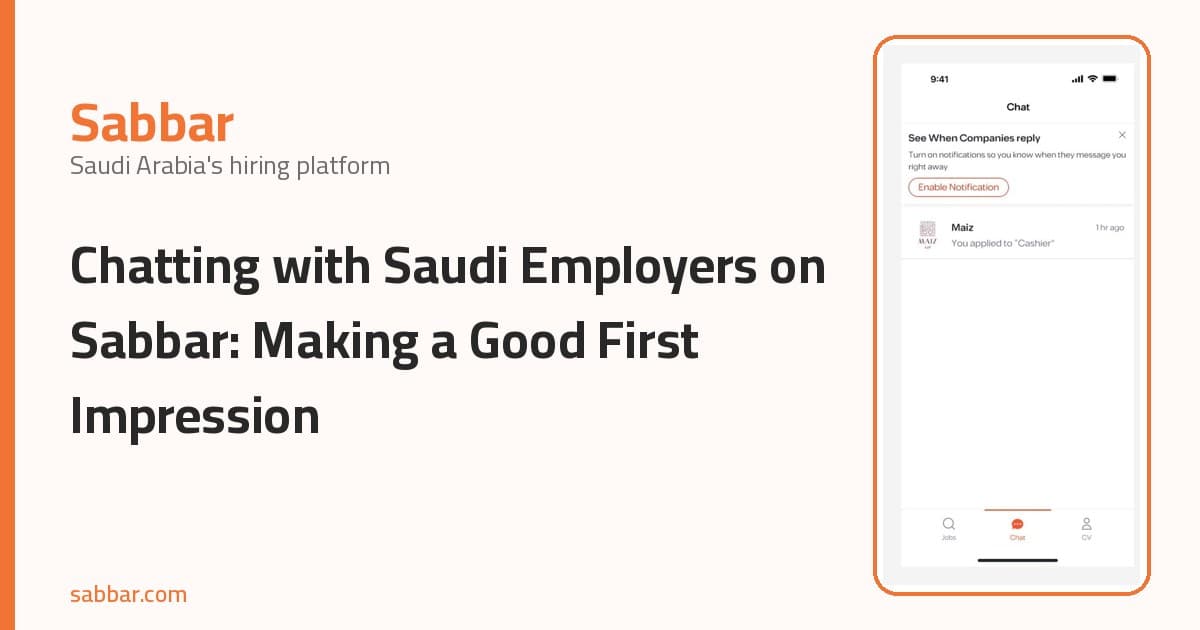
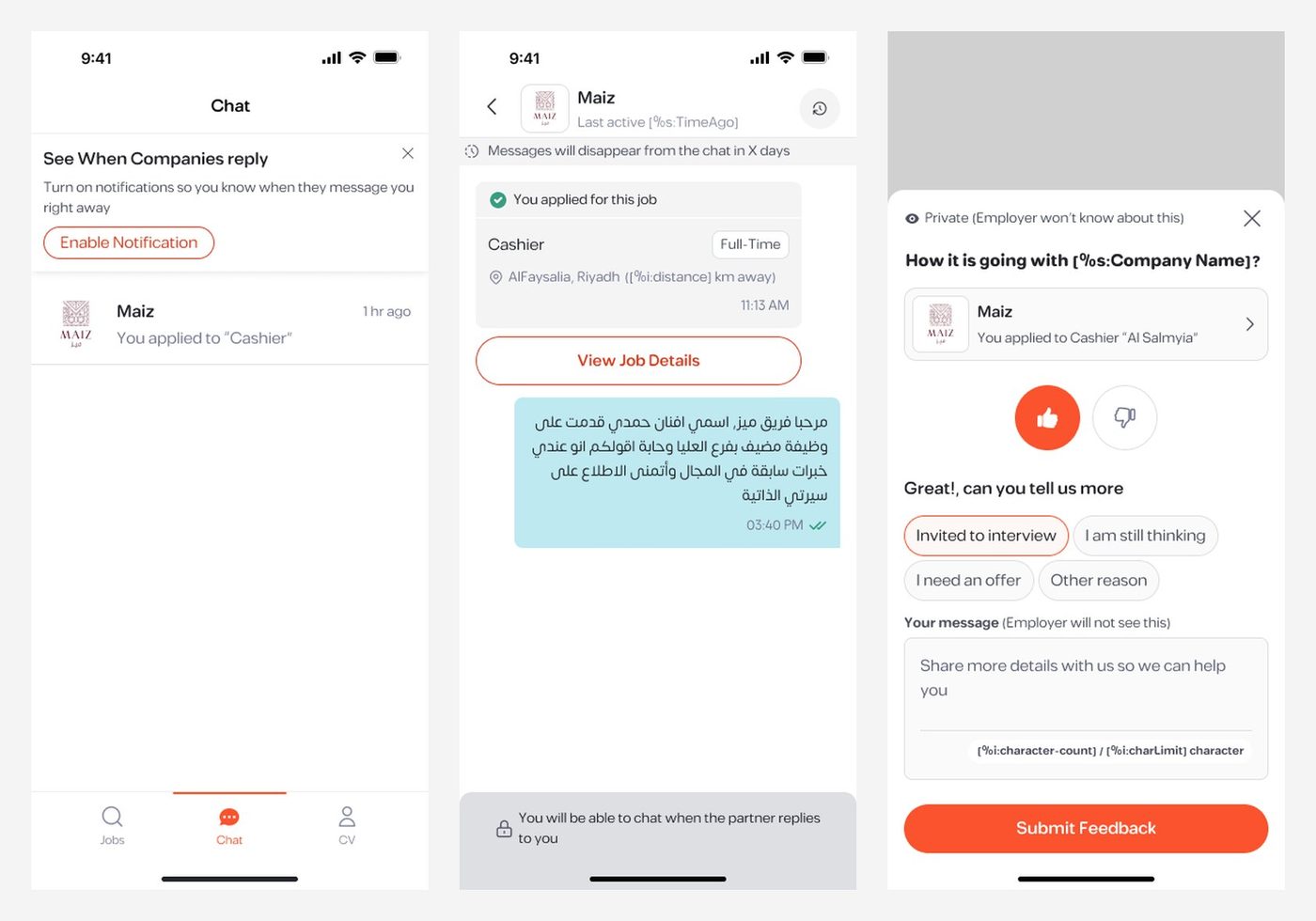
Messages to employers on Sabbar go through the Chat tab, the third tab in the app. It holds one conversation per company, with messages and your application events together.
A chat opens when a company contacts you after you apply, or after you answer a job invitation. Saud interviews happen there too. For an overview of the app, read the Sabbar job app guide.
What do you see inside a chat?
You see messages along with events that show what happened to your application.
- You applied to the job.
- The company viewed your CV.
- The company unlocked your CV.
- The company is asking you to upload a CV.
- The job was closed.
- Calls, attachments, reactions and seen ticks.
These events help you gauge the company's interest before you write.
Why does the first impression matter?
It matters because a recruiter is chatting with dozens of applicants the same day. The app itself tells you at your first chat that first impressions matter, and shows good and bad message examples.
A clear, polite message puts you at the top of the list. A vague or late one puts you at the bottom.
6 rules for a strong first message
- Open with a full greeting: a hello and your name.
- Name the job: the company may have several posts.
- One sentence on your experience.
- State your availability: when you can start or come to an interview.
- Write properly: no abbreviations, no errors.
- Close with thanks.
No chats yet? Apply to more jobs. Browse open jobs on Sabbar and pick those close to your experience and district.

Sabbar is Saudi Arabia's leading local hiring platform
The go-to place for job seekers and employers across every sector in the Kingdom, with more than 1.5 million job seekers and thousands of companies
Get started with Sabbar today!
Examples: a strong message and a weak one
When the company replies to your application
- Weak: "What's the salary?"
- Strong: "Hello, thank you for getting in touch. I'm [name]. I worked for a year as a cashier in a restaurant, and I'm free for an interview tomorrow any time after 4 pm."
When asked about experience
- Weak: "I have experience."
- Strong: "I spent eight months in customer service at a retail store, handling the till and returns."
When asked for a time
- Weak: "Any time."
- Strong: "Sunday or Monday between 4 and 7 pm suits me. Is the interview at the [district] branch?"
When declining
- Weak: no reply.
- Strong: "Thank you for the opportunity. I have accepted another job and wish you all the best."
How do you answer a job invitation?
When a company invites you, a card appears in chat with three options.
- I am interested: and the chat opens straight away.
- I need more details: if you want salary or location first.
- I am not interested: if it does not suit you.
Reply the same day. An invitation means the company liked your profile, so do not let it go cold. For Saud's interviews, see Saud AI interview: how to prepare.
When should you ask about salary?
Ask after you have introduced yourself, not as your first word. The salary is usually in the job post, so read it first.
- If it is stated: do not ask; ask about shifts or the start date instead.
- If it is not: "Could you share the salary range and the working hours?"
- Do not negotiate in the first chat before they know you.
How fast should you reply?
Within hours is the standard. Turn on app notifications so a company's message reaches you at once.
- Reply within an hour during working hours if you can.
- If you are busy: "I got your message and will reply in full within two hours."
- Never leave a message unanswered for more than a day.
What should you never share in chat?
Sabbar reminds you inside the chat: be attentive when dealing directly with companies, and do not share any sensitive information.
- Passwords or verification codes.
- Your bank card details.
- Any money, under any name.
- An ID copy before a clear job offer.
If anyone asks for these, report it. See Fake jobs and job scams in Saudi Arabia.
What is the private feedback card?
The private feedback card appears in chat and asks how it is going with that company. The company never sees your answer. It helps Sabbar improve the experience, so answer frankly.
Common mistakes when chatting with employers
- A one-word message.
- Lots of emojis and casual slang.
- Several messages in a row before the company replies.
- Asking about things written in the post.
- Disappearing after a slot is agreed.
- Long, rambling voice notes.
How do you prepare before chats begin?
- Complete your CV and attach a file. See One CV for every job in Saudi Arabia.
- Prepare two lines about yourself to use in any chat.
- Know your availability this week.
- Check your application statuses so you know who viewed your CV.
Notifications are what get you into the chat on time. Download the Sabbar app and switch them on so you never miss a company's message.
An illustrative example: a full chat that ends with an interview time
This illustrates a successful chat from the job seeker's side; it is not a real conversation. A job seeker applied for a receptionist role at a fitness club in Khobar.
- Employer: "Hello, we saw your application for the reception role. Are you still interested?"
- Job seeker: "Hello, yes I am. I am Sara, I worked for a year at a clinic reception, and I can start within a week."
- Employer: "Great. It is an evening shift from 3 to 11. Does that suit you?"
- Job seeker: "It does. I live in a district close to the branch. Is there a fixed day off?"
- Employer: "Yes, one day a week. Could you come for an interview tomorrow at 5?"
- Job seeker: "Yes, I will be there tomorrow at 5. Should I bring anything?"
Notice three things: she answered each time with a clear sentence, offered useful information without being asked, and put only one question in each message.
How to answer the difficult questions in chat
Some questions make job seekers hesitate or answer vaguely. Prepare your answers beforehand.
- "Why did you leave your last job?": give the reason briefly and without criticising anyone: "The seasonal contract ended" or "I am looking for a job closer to home."
- "What salary do you expect?": a figure close to the one in the post, or a narrow range.
- "You do not have enough experience": "My experience is short, but I trained on this and I learn quickly, and I am open to a trial period."
- "Would you accept a different shift?": answer honestly about what you can do. Accepting a shift that does not suit you ends in a resignation.
- "When can you start?": a specific date, not "soon".
When to send a voice note and when to type
Chat on Sabbar accepts both, and each has its moment.
- Type information the employer will need to refer back to: availability, times and numbers.
- Type when you are somewhere public or noisy.
- Use voice when the employer asks to hear you, or the job depends on speaking, such as customer service.
- Use voice to explain a situation that is long to type, and keep it under a minute.
- Either way: start with a greeting, speak calmly, and end with thanks.
What to do if the employer does not reply
Silence does not always mean rejection. They may be halfway through reviewing applicants.
- Wait two or three days after your last message.
- Send one polite follow-up: "Hello, I wanted to confirm my interest in the (title) role, and I am available for any questions."
- Do not repeat messages: one follow-up is enough. Repeating leaves a bad impression.
- Watch the application status in the Applications tab.
- Keep applying: do not pause your search for one reply.
After the interview: a short thank-you message
Few people send one, which is why it stands out. Send it the same day through chat.
"Thank you for your time today. Meeting the team and learning about the work made me more interested in the role, and I am available to start on the date I mentioned. I look forward to hearing from you."
Three lines that remind the employer of you, confirm you are serious, and keep the door open.
Apply today and start your first chat with a Saudi employer
More than 12,000 companies contact applicants through Sabbar chat. Apply to what suits you, reply quickly and clearly, and let your first message open the door to an interview.
Summary
Your message to an employer on Sabbar goes in one chat per company. A first message with a greeting, your name, your experience and your availability, a reply within hours and proper writing are enough to put you ahead of most applicants. Never share money, codes or bank details with anyone.
FAQs about chatting with employers on Sabbar
Can I message any company directly?
A chat opens after a company contacts you following your application, or after you answer its invitation.
Does the company know I read its message?
Yes. Chat has seen ticks.
Can I send my CV in chat?
Yes. You can send attachments, and the company may ask you to upload a CV from the chat.
Does the company see my private feedback?
No. The private feedback card is never shown to the company.
What if someone asks me for money?
Do not pay, and report the job from its page or through "Contact us".