A hundred applicants for the same job, and all of them wrote "hard-working and good under pressure". What makes the employer remember you? A video resume: one minute of you talking about yourself, so the employer sees and hears you before any interview.
In the Sabbar app you record an introductory video from your phone for free. This article covers the steps, what to say, and how to avoid the mistakes that get a video returned.
What you will learn
- What the introductory video is and why it helps.
- The recording steps inside the Sabbar app.
- A ready one-minute script you can adapt.
- The acceptance guidelines and common mistakes.
What is a video resume on Sabbar?
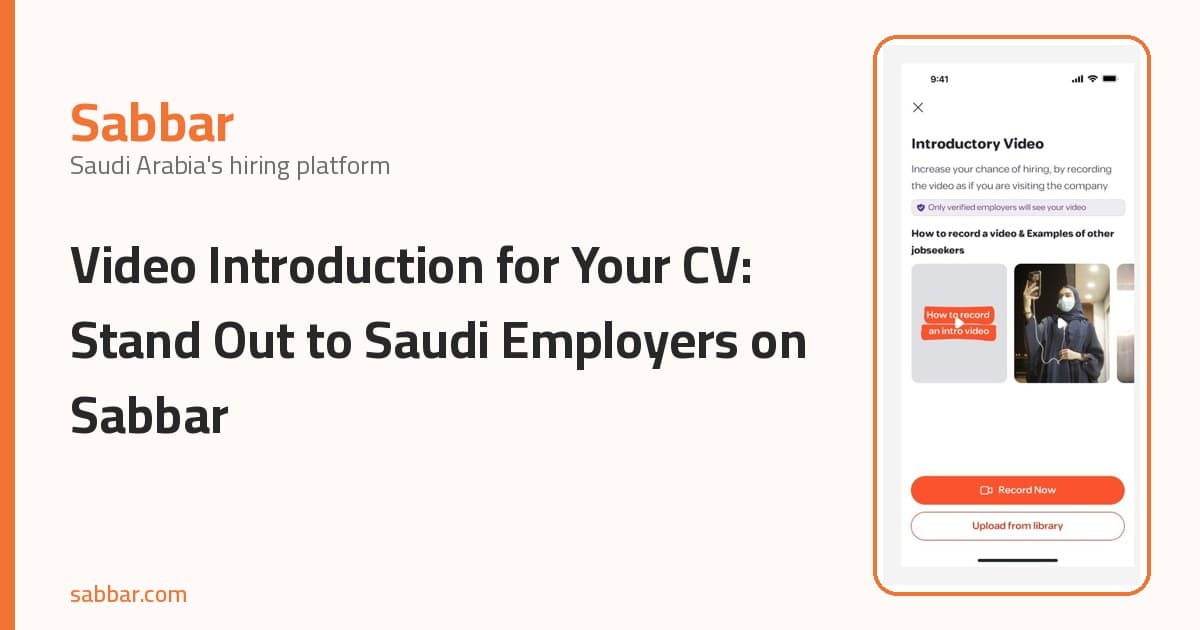
A video resume on Sabbar is a short introductory video you add to your CV in the app. You introduce yourself, your experience and your skills, and only verified employers can watch it when they open your profile.
It is optional and free, and Sabbar reviews it before it appears. It is one of three tasks that raise your CV's visibility, covered in How to make your CV more visible on Sabbar.
Why add an introductory video?
Add one because it gives you a clear edge for jobs that involve people.
- You are seen and heard: the employer meets your manner, not just a page.
- Higher visibility: the video raises your CV visibility gauge.
- It offsets limited experience: enthusiasm and clarity come across on video.
- A shorter route: some employers contact people directly after watching.
How do you record the introductory video on Sabbar?
Record it in six steps from the CV tab.
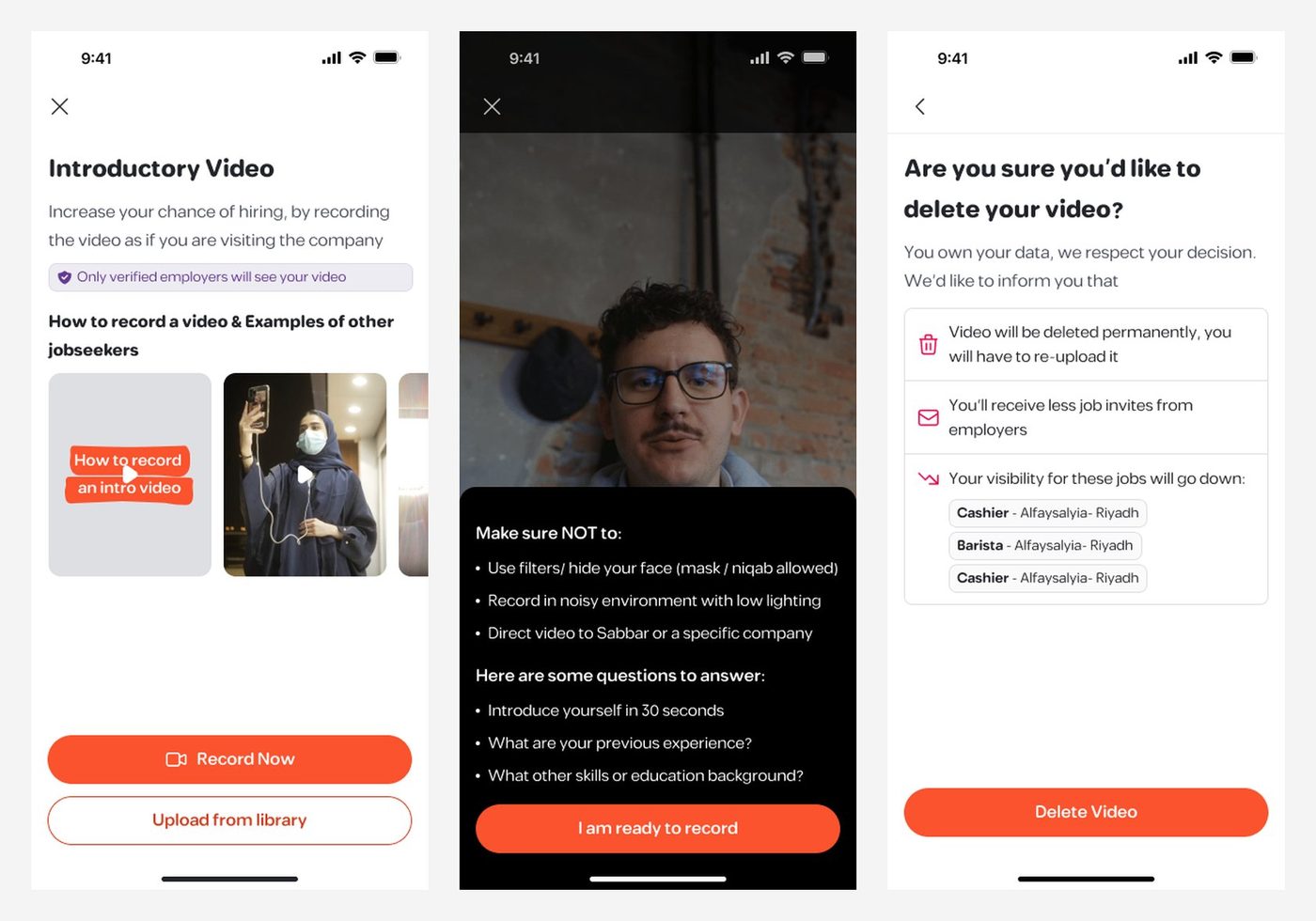
- Open the CV tab and choose Introductory Video.
- Read the examples and guidance the app shows.
- Choose "Record Now" or "Upload from library".
- Record while answering the suggested questions.
- Watch it before sending and re-record if needed.
- Submit it for review; it appears on your profile once accepted.
The camera is in your pocket and recording is free. Download the Sabbar app and record your one-minute video today.

Sabbar is Saudi Arabia's leading local hiring platform
The go-to place for job seekers and employers across every sector in the Kingdom, with more than 1.5 million job seekers and thousands of companies
Get started with Sabbar today!
What should you say? A ready one-minute script
Say three things in order: who you are, your experience, and what you are looking for. The app suggests similar topics: introduce yourself, your experience, your skills or education.
Adapt this template:
- Greeting and name: "Hello, I'm [your name], from [your city]."
- Experience or study: "I worked as a [title] at a [type of business] for [duration]", or "I graduated in [field]".
- Two key skills: "I'm good with customers and stay calm during rush hours."
- What you want: "I'm looking for a [full-time or part-time] [title] job in [area]."
- Close: "I can start [when]. Thank you for your time."
Practise twice before recording and speak naturally. Do not read from a page.
What are the acceptance guidelines?
The video is accepted if it follows four rules shown before you record.
- No filters.
- A clear face: a mask or niqab is allowed.
- Good light.
- No noise.
If the video does not meet the guidelines it is returned for you to fix, and a "Requires Your Attention" card appears in your feed.
8 tips for a video that leaves a good impression
- Pick a quiet place: a closed room beats a café.
- Face the light: sit facing a window, not with it behind you.
- Steady the phone: on a stand or books, at eye level.
- Look at the lens: not at yourself on screen.
- Dress as you would for an interview.
- Speak slowly and clearly.
- Smile in the first and last two seconds.
- Stay within a minute: short and clear beats long.
Common mistakes that weaken a video
- Recording in a car or on the street.
- Reading a script word for word with moving eyes.
- General statements with no detail about your experience.
- Leading with salary or conditions.
- A messy background or people walking past.
Is the video safe, and who sees it?
Yes. Only verified employers can watch the video; it is not public. You can delete it at any time from the same screen, and the app confirms it: you own your data, and your decision is respected.
What comes after recording?
After recording, complete the rest of your profile so the video works for you.
- Add a profile photo that follows the guidelines.
- Write your experience and skills. See One CV for every job in Saudi Arabia.
- Apply early to jobs that suit you.
If a company invites you to an interview with Saud, you will answer by text or voice there. The introductory video is one thing; the Saud interview is another. See Saud AI interview: how to prepare.
Video ready? Let employers see it. Apply to open jobs on Sabbar and check who viewed your CV.
Three scripts for three situations
A general template helps, but a ready example is easier. Here are three illustrative scripts. Change the details to match your real situation.
- With experience: "Hello, I am Khalid from Jeddah. I worked for three years as a sales associate at an electronics showroom, responsible for the mobile phones section and for training new staff. I am good at explaining products and closing sales. I am looking for a full-time sales job in Jeddah and can start in two weeks."
- Fresh graduate: "Hello, I am Noura from Riyadh, a business administration graduate. I trained for two months in a customer service department, where I learned to handle enquiries and log requests. I am confident with Office software and I learn quickly. I am looking for my first administrative role and can start immediately."
- Student wanting part-time work: "Hello, I am Faisal from Dammam, a university student. I am looking for part-time evening work at a café or restaurant near Al Shati district. Last summer I worked as a cashier for two months. I am available from 5 pm every day."
Each script has a city, specific experience or training, a skill, and what the person wants. Do not memorise the words. Memorise the order.
How to practise before recording
The difference between a nervous video and a confident one is fifteen minutes of practice. Follow these steps.
- Write your script in four sentences: no more.
- Read it aloud three times: until the words feel familiar.
- Record a first take and do not send it: watch it and notice your pace, eye contact and voice.
- Change one thing per attempt: slow down a little, speak up, or look at the lens.
- Stop at the third or fourth take: a good video is enough. There is no perfect one.
What to do if you are camera-shy
Being shy in front of a camera is normal, and most people who recorded a video felt it. These are practical fixes.
- Record alone: nobody else in the room.
- Put a small note near the lens: keywords only, not the whole script.
- Imagine you are speaking to one branch manager: not an audience.
- Start with the greeting: the first sentence is the hardest, and it gets easier after that.
- Remember you can re-record: and that you can delete the video at any time.
The video is optional. If you are not comfortable, strengthen your profile with the photo, the summary and experience written with duties.
When should you update your video?
An old video can give the wrong picture. Update it in these cases.
- Your goal changed: you were looking for part-time and now want full time.
- New experience: you added an important job or training.
- You moved city or district: because you mentioned them in the clip.
- An old low-quality video: recorded in a hurry on your first day.
An updated video goes through the same review before it appears on your profile.
What employers look for in the first seconds
Recruiters watch many clips, and these things make them finish yours.
- A clear voice from the first word.
- A direct introduction: name, city and field, without a long preamble.
- A specific fact: a period and a title, not "I have experience".
- Calm: very fast speech suggests nervousness.
Record your one-minute video and stand out from other applicants
Saudi employers on Sabbar watch introductory videos before deciding whom to interview. Record yours for free on your phone, introduce yourself in your own voice, and raise your CV's visibility from day one.
Summary
A video resume on Sabbar is one minute in which you say who you are, what you have done and what you want. Record it somewhere quiet with good light and no filters, speak naturally, and you give employers a reason to remember you.
FAQs about the introductory video on Sabbar
Is the introductory video required?
No. It is optional, but it raises your CV's visibility.
How long should the video be?
About one minute is enough to introduce yourself and your experience.
Can I re-record?
Yes. You can delete the video and record another at any time.
Who watches the video?
Verified employers only.
Can I record wearing a niqab?
Yes. The guidelines allow a mask or niqab.