Hiring for Multiple Branches Across Saudi Cities with One Job Post: Always Hiring on Sabbar 2027


You have fifteen branches across Riyadh, Jeddah and Dammam, and each needs a cashier or two every month. Do you publish fifteen posts and track each one? That is the core problem of multi location hiring: the administration takes more time than the hiring.
Sabbar solves it with two Enterprise features: Always hiring and Job Locations. One job, many branches, and each branch opens and closes on its own.
What you will learn
- What Always hiring and Job Locations mean.
- How one job works across several branches.
- What a job seeker sees on a multi-branch job.
- Setup steps and tips for continuous hiring.
What is multi location hiring with one job post?
Multi location hiring with one job post means publishing a single job that covers more than one workplace, instead of a separate post per branch. The applicant applies once, and the system connects them with the right branch.
On Sabbar, two features make this work:
- Always hiring: a job with no closing date that stays open and keeps taking applicants.
- Job Locations: the company's branch list, which you attach to the job and control branch by branch.
Why is multi-branch hiring tiring the traditional way?
It is tiring because each branch becomes its own hiring project.
- Duplicate posts with the same text for each branch.
- Applicants applying to a branch far from them.
- Branches that are full while their post stays open.
- Branches in need whose post expired unnoticed.
- No single view for management of demand across sites.
How does Always hiring work on Sabbar?
An Always hiring job is created in three steps on the Sabbar employer platform.
- Job Details: title, description, salary and requirements.
- Recruitment Stages: the fixed stages plus any custom ones.
- Saud Configuration: auto interview criteria and your questions.
The job has no closing date. It keeps collecting applicants, Saud screens and interviews, and you draw from the list whenever a branch needs someone.
How do Job Locations work?
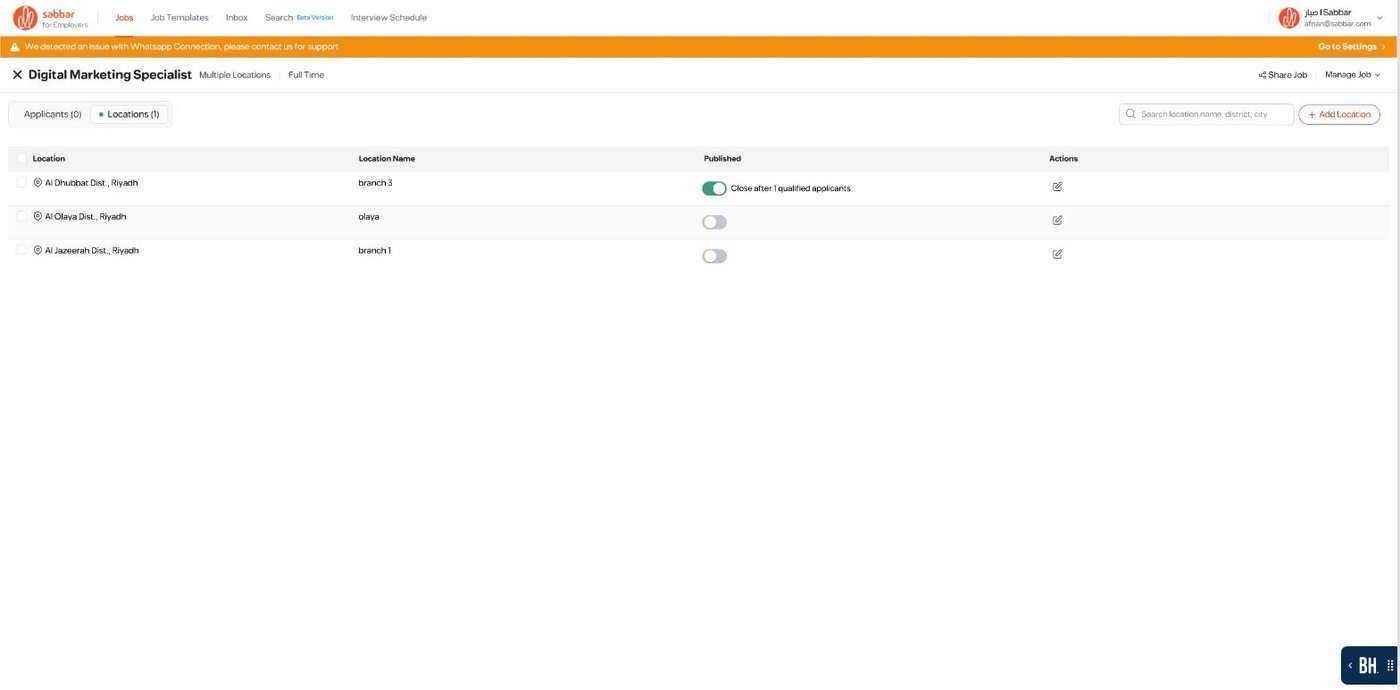
Job Locations is a company-wide list of branches. You add branches once, then attach them to any job.
- A publish switch per branch: open hiring at one and pause it at another.
- Auto-close: a branch closes automatically once Saud finds enough qualified applicants for it.
- Central control: see every branch and its status on one screen.
Is your chain growing while your job posts multiply? See Sabbar's solution for frontline teams and ask about one job that covers every branch.

Sabbar is Saudi Arabia's leading local hiring platform
The go-to place for job seekers and employers across every sector in the Kingdom, with more than 1.5 million job seekers and thousands of companies
Get started with Sabbar today!
What does the job seeker see?
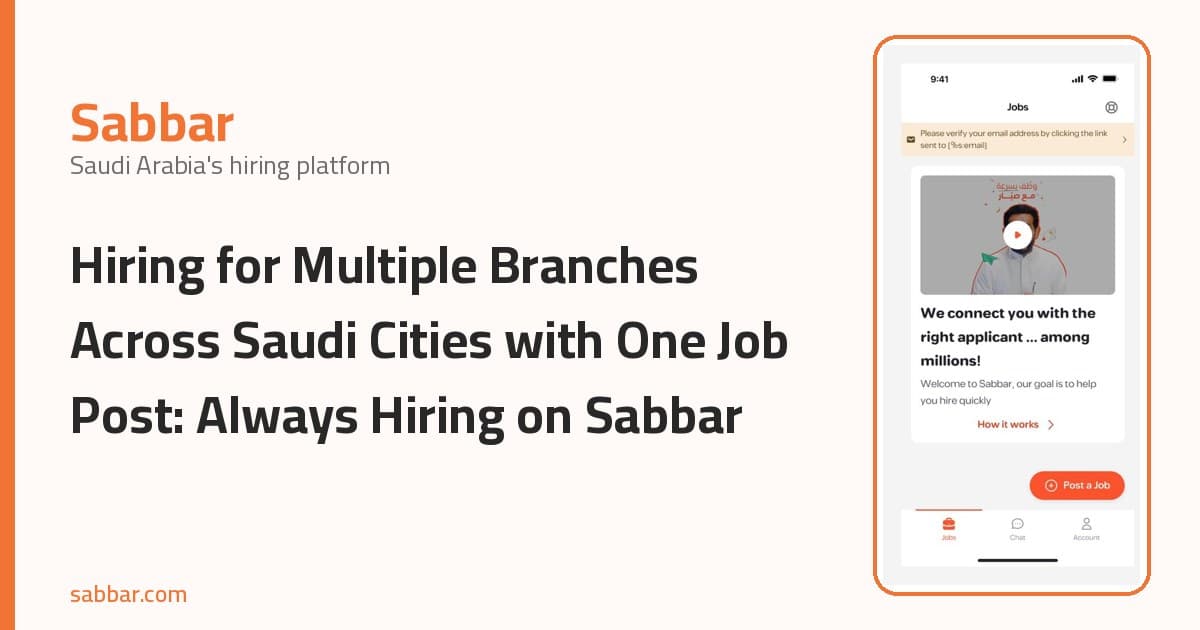
The job seeker sees one job with the branch nearest to their home. They do not have to scan a branch list.
- The job card shows the area and distance to the nearest branch.
- An "Always Hiring" tag shows the job stays open.
- The job page shows the nearest branch's location.
That raises applicant quality, because the people applying live near a real branch.
What is Saud's role in multi-branch hiring?
Saud runs the repetitive stages for all applicants, however many branches there are.
- Screening: he rates each applicant and takes distance into account.
- Auto interviews: he interviews those who match your criteria, with your questions.
- Enough is enough: when a branch has enough qualified applicants, it closes automatically.
- Follow-up: he coordinates slots and reminds candidates.
Details are in AI mass hiring for restaurant and retail chains and Automated interview scheduling with Saud.
Setup steps for hiring across branches
- Collect branch data: name, district and city for each.
- Add branches to Job Locations: once, at company level.
- Standardise the job description: one that works for every branch.
- Create an Always hiring job: and attach the branches.
- Set Saud's criteria and questions.
- Publish only for branches in need.
- Review weekly: who is full and who needs people.
Who manages what? Roles on the account
One account holds your whole team, with unlimited users.
- Recruitment Manager: sets up jobs, branches and criteria.
- Recruiter: reviews and contacts applicants.
- Branch managers: take part in the final interview.
Who are these tools for?
They suit businesses hiring the same titles at many sites.
- Restaurant and café chains.
- Retail stores and supermarkets.
- Security, cleaning and facilities companies.
- Service and maintenance centres.
- Delivery and logistics companies.
The Chunk case study on turnover in F&B shows why steady hiring matters in these sectors.
5 tips for managing continuous hiring
- Do not open every branch at once: start with the neediest.
- Set a numeric target per branch.
- Reply fast: frontline candidates do not wait.
- Review rejection reasons: and relax criteria that are too strict.
- Update salary and benefits: by the market in each city.
Want to see the setup on your own branches? Book a Saud demo and the team will prepare an example for your chain.
An illustrative example: a fifteen-branch chain and one job post
This illustrates the workflow; it is not a real customer case. A bakery chain has fifteen branches in three cities and needs cashiers all the time.
- Setup: the hiring team adds the fifteen branches to Job Locations once, and creates an Always Hiring "Cashier" job with one description and one salary.
- Week one: eight branches need staff, so publishing is switched on for those only. Applicants see the branch nearest their home.
- While it runs: Saud interviews applicants against the set criteria and questions. Three branches reach their number of qualified candidates and close automatically.
- A month later: an employee resigns at a closed branch. The team reopens publishing for that branch with one click, without writing a new post.
- Throughout: management sees on one screen which branches are open and which are full.
The team did not write fifteen posts, and did not review applicant lists for branches that needed nobody.
How to split roles between head office and branch managers
Multi-branch hiring fails when nobody knows who owns what. Here is a practical split.
- Central hiring team: writes the standard description, sets Saud's criteria and questions, and opens and closes publishing per branch.
- Branch manager: reports need early, holds the final interview, and decides who fits the team.
- Saud: screening, first interview, scheduling and follow-up.
- Senior management: reviews demand across locations and approves headcount.
Add branch managers as users on the company account, since users are unlimited, so they see their own branch's candidates directly.
How many qualified candidates do you need per branch?
The number you set per branch controls when it closes automatically. Work it out rather than guess.
- Start from the vacancies: how many people the branch really needs.
- Add a margin for drop-outs: not every qualified candidate attends the final interview or accepts the offer.
- Consider the branch: remote branches or hard shifts need a bigger margin.
- Review after the first cycle: if the branch closed and hiring was not completed, raise the number. If many candidates were left uncontacted, lower it.
A practical rule is three to five qualified candidates per vacancy, adjusted to what you see in your branches.
Indicators to track at branch level
A single view only helps if you look at the right numbers.
- Time to fill per branch: shows where hiring is hardest.
- Applicants per branch: a low figure means few job seekers in the area or a salary that does not suit it.
- Attendance at the final interview: affected by branch location and how fast the interview is booked.
- Resignations within three months: points to a problem in the branch, not in hiring.
- How often a branch reopens: a branch that reopens every month needs a look at its working environment.
Common mistakes in multi-branch hiring
- A different description per branch: confuses applicants and makes comparison hard. Standardise the description and change only the location.
- Leaving every branch open: brings applicants for branches that need nobody, and then nobody contacts them.
- Late reporting of need: a branch manager who asks for a hire on the day a colleague resigns starts two weeks behind.
- One salary for very different areas: some locations need a transport allowance or an incentive.
- Never reviewing Saud's criteria: criteria set at setup need adjusting after the first month.
Cover every branch with one job that works all year
One job, many branches, and each branch closes itself when it has enough. Sabbar connects you with more than 1.5 million job seekers and shows each of them your nearest branch.
Summary
Multi location hiring gets simpler with Always hiring and Job Locations on Sabbar: one job open continuously, branches run from one screen with publish and auto-close, and job seekers who see the branch nearest to them.
FAQs about hiring across branches on Sabbar
Is Always hiring available in every plan?
No. Always hiring and Job Locations are part of the Enterprise toolset.
Do I need a job post per branch?
No. You publish one job and attach several locations.
When does a branch close automatically?
When Saud finds enough qualified applicants for that branch.
Does the applicant see every branch?
They see the branch nearest to their home on the job card and page.
Can I pause hiring at just one branch?
Yes. Each branch has its own publish switch you can turn on or off at any time.