Advanced Applicant Filters on Sabbar: Experience, Nationality, District and Skills 2027


Two hundred applicants for one job. Some live minutes away and others in another city; some have three years' experience and others have never worked. Reading them one by one takes days. Applicant screening with filters cuts that to minutes.
Sabbar has advanced filters in the Companies App and on the web platform. This article explains each filter, when to use it, and how to combine filters to reach the people you want.
What you will learn
- What advanced filters are and where to find them.
- The key filters: experience, nationality, district and skills.
- Ready filter combinations for different roles.
- Filtering mistakes that cost you good candidates.
What is applicant screening with advanced filters?
Applicant screening with advanced filters means narrowing the list of applicants to your job by criteria you choose, such as experience, district and nationality, so a smaller group matching what you need is shown.
Advanced Filters are part of every Sabbar plan, and some filters in the app need a paid plan. They work on top of the fit rating: Saud ranks applicants, and you narrow the list.
Where do you find the filters?
- In the Sabbar Companies App: above the applicants list for a job.
- On the web platform: in table view and board view.
- In Candidate Search: filters specific to the CV database.
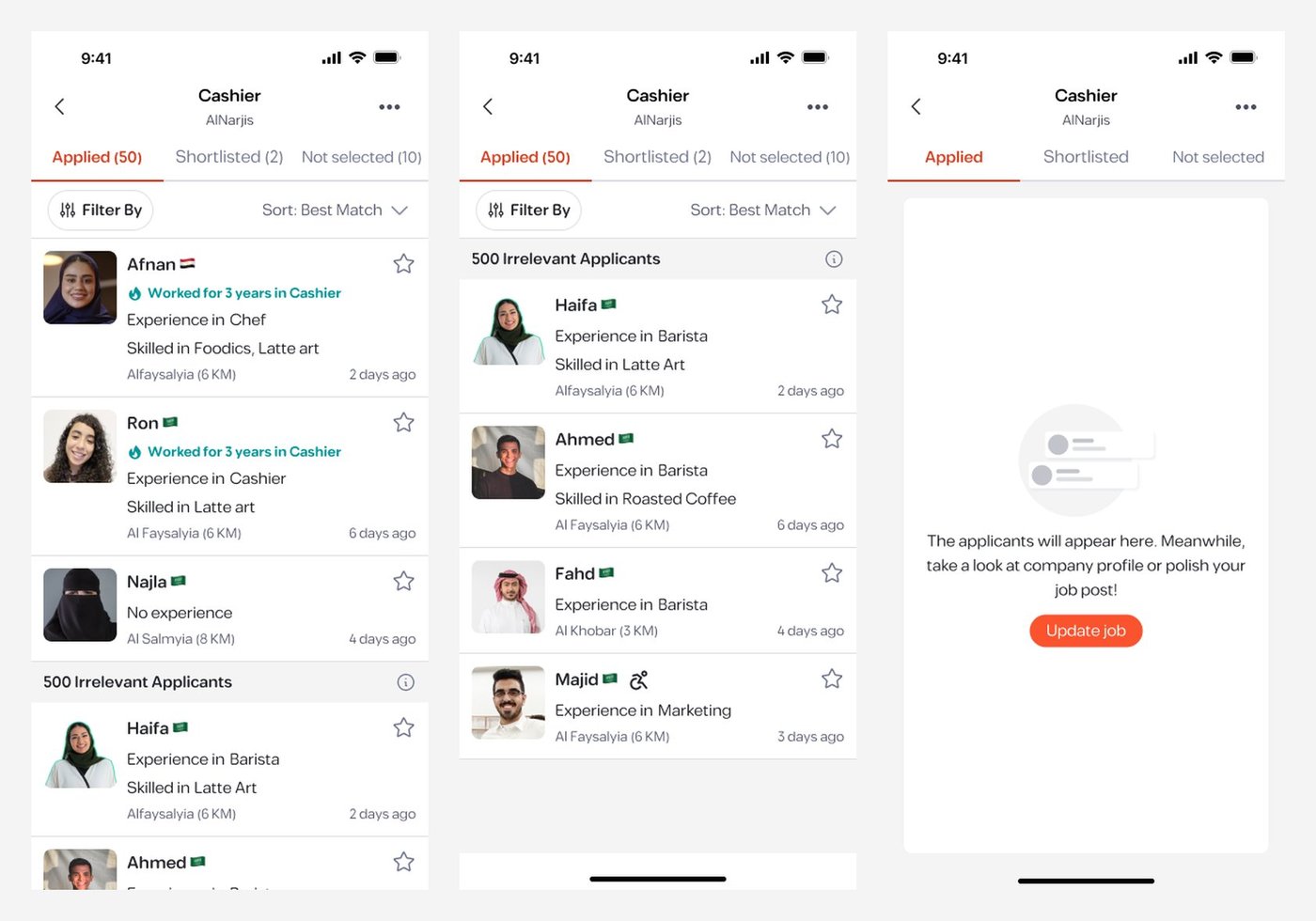
What are the key filters, and how do you use them?
The experience filter
Shows applicants by their experience in the field or title. Use it when you need someone who can start without long training. The applicant card also shows experience in the role itself.
The nationality filter
Saudi / non-Saudi, plus a filter by nationality. Essential for localized professions and for your Saudization ratio. See the Saudization hiring guide.
The district filter
Shows people living in particular districts. Distance is decisive for frontline roles, and the applicant card shows district and distance from the workplace.
The skills filter
Shows people with the skills you select. Useful where a specific skill matters, such as a point-of-sale system or particular software.
Try the filters on real applicants. Post your job on Sabbar for free and watch the list shrink to the best fits.

Sabbar is Saudi Arabia's leading local hiring platform
The go-to place for job seekers and employers across every sector in the Kingdom, with more than 1.5 million job seekers and thousands of companies
Get started with Sabbar today!
What other filters does the Companies App have?
- Gender.
- Employment status: currently working or not.
- Contract preference: full-time or part-time.
- Age group.
- Special needs.
- Training and certificates.
- Health card: for food workers.
- Salary range.
- Language.
Use each filter when it ties to a real requirement of the job and to what the regulations allow.
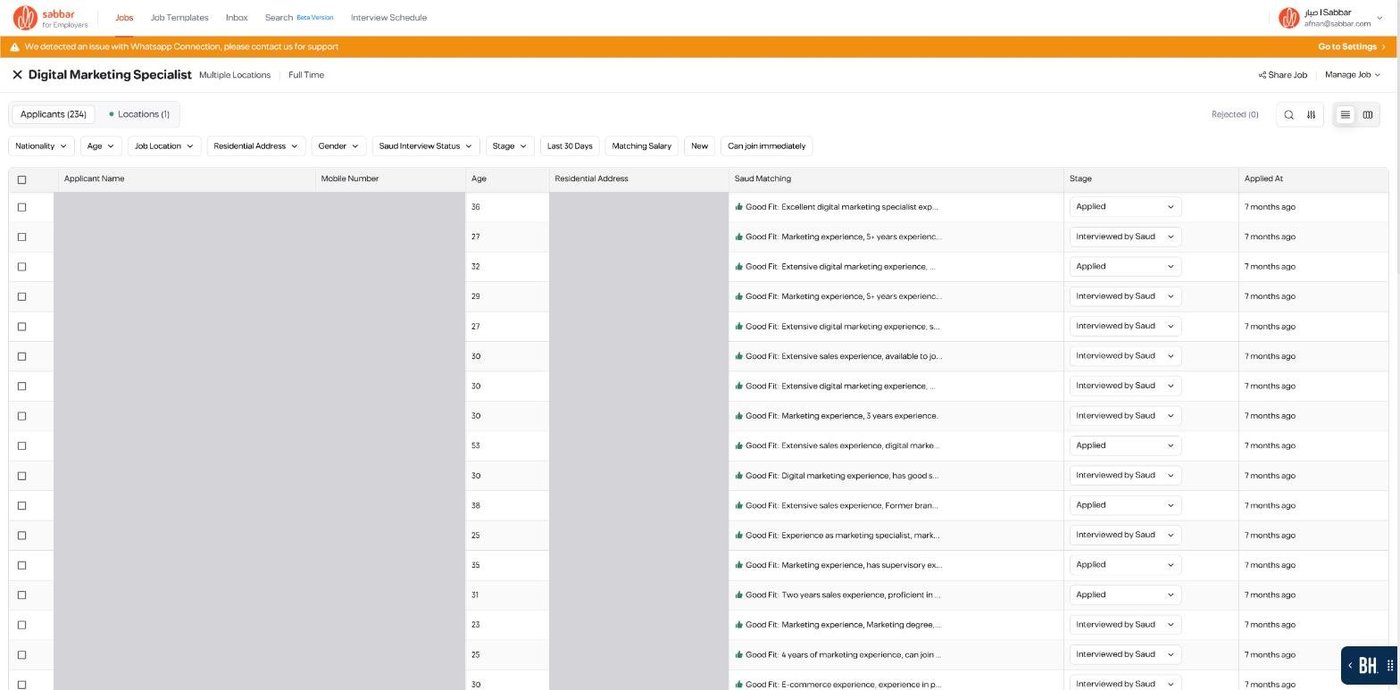
What extra filters does the web platform add?
The web platform adds filters for workflow.
- Job location: for multi-location jobs.
- Residential address.
- Saud interview status: who was interviewed and who was not.
- Stage: Applicants, Shortlisted and so on.
- Recent, and new.
- Matching salary: those whose expectations fit your offer.
- Can join immediately.
How do filters work with Saud's matching?
Matching ranks; filters narrow.
- Every applicant has a Good Fit or Close Fit rating with a reason.
- You sort the list by Best Match or Newest.
- You apply filters and the group you want remains, still ranked.
- Low-match applicants are grouped at the end of the list.
See AI CV screening in Saudi Arabia.
Ready filter combinations by role
- Cashier for a specific branch: district + health card if required + can join immediately.
- Sales associate in a localized profession: Saudi + experience + district.
- Part-time barista: contract preference part-time + district.
- Bilingual customer service: language + experience.
- Shift supervisor: experience + matching salary + Saud interview status.
- An urgent role: can join immediately + recent.
How do you filter, step by step?
- Open the applicants list for the job.
- Sort by Best Match.
- Apply one filter: the one that matters most for the job.
- Look at the number left.
- Add a second filter if the list is still long.
- Open profiles and move the right people to the shortlist.
Start with one filter and add gradually. Many filters at once hide good candidates.
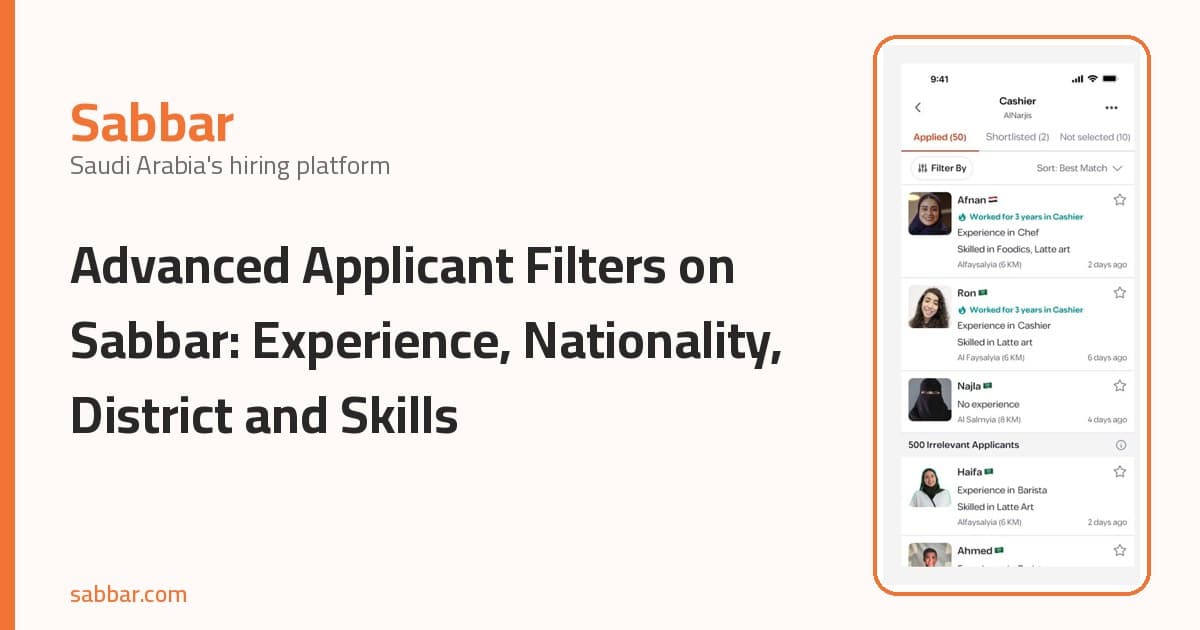
What do you see on the applicant card after filtering?
- Name and nationality.
- Experience in the role.
- Skills.
- District and distance.
- Applied time.
- Tags: New, Recommended.
From the card you shortlist or choose "Not a match". A dismissed applicant is not notified.
Common mistakes when filtering applicants
- Too many filters at the start: ending with an empty list.
- An experience filter for a job learned in a week: losing keen people with no experience.
- Ignoring district: then a resignation over the commute.
- Relying on filters alone: without opening profiles and videos.
- Filters unrelated to the job's requirements: risking unintended discrimination.
- Forgetting to clear a filter: and thinking applicants are few.
How do you use filters fairly and lawfully?
- Tie every filter to a real work requirement.
- Check the localization decisions before using the nationality filter.
- Do not exclude a group without a reason tied to the nature of the job.
- Record your rejection reasons.
For the general rules, read Job ad rules in Saudi Arabia.
What improves filtering results from the start?
Filters work on structured data. The more precise your post, the better the results.
- Pick the title from the list.
- Set the district precisely.
- Fill in the requirement and skills fields.
- Enter the real salary.
See How to write a job description in minutes with Saud and Salary in job posts in Saudi Arabia.
What comes after filtering?
- Move the best to the shortlist.
- Contact them by chat.
- Let Saud run the first interview if numbers are high.
- Book the final interviews.
Follow-up is covered in Recruitment process in Saudi Arabia and Recommended candidates and instant applicant alerts.
Want to contact the people your filters kept? See Sabbar's plans; every one includes Advanced Filters.
An illustrative example: from two hundred applicants to eight profiles
This is an illustration and the figures are hypothetical. A supermarket in Riyadh posts a cashier job for its Al Narjis branch and receives two hundred applicants.
- Sort by best match: the most suitable rise to the top.
- Apply the district filter: choosing districts near the branch leaves about fifty.
- Add "can start immediately": the job is urgent, which leaves about twenty.
- Open the twenty profiles: read the experience and watch the intro video where there is one.
- Move eight to the shortlist: and message them the same day.
The experience filter was not used, because working a point of sale is learned in days. Two filters cut the list, and the final decision came from reading profiles, not from the filter.
When do you not need filters at all?
A filter is a tool for long lists. Used in the wrong place, it costs you candidates.
- Few applicants: twenty profiles can all be read in half an hour. Sorting by match is enough.
- A job learned quickly: enthusiasm and proximity matter more than years of experience.
- A hard-to-fill job: every applicant deserves a look, so do not narrow a list that is already narrow.
- The first day after posting: wait until enough applicants have gathered, then filter.
The rule: if you can read every profile in one sitting, read them.
Essential or preferred? Decide before you filter
Most filtering mistakes come from mixing up what the job cannot do without and what you would simply like.
- Essential: what the work cannot be done without, such as a language needed for dealing with customers, or being able to work a specific shift.
- Preferred: what makes a candidate better but is not a condition, such as previous experience in the same sector.
- Write the job's requirements as a list.
- Mark the essential ones; there will rarely be more than two or three.
- Filter by the essentials only.
- Use the preferred ones to choose between those who remain as you read their profiles.
That way you do not exclude a good candidate over something you would have waived at interview.
What do you do if the list comes back empty or very short?
An empty list does not mean nobody suits you. It means your filters are narrower than the market.
- Remove the last filter you added: and see how many come back.
- Widen the district: add neighbouring districts.
- Relax the experience: would you accept less experience with training?
- Check the salary: if the compatible-salary filter hides most people, your offer may be below market expectations.
- Check the post itself: an imprecise title or an unspecified district brings unsuitable applicants from the start.
If the list is still short after all that, the answer is attracting more applicants rather than filtering: invite the recommended candidates.
A last look before you close the job
Before you close the job, give the people your filters hid two minutes.
- Clear all filters: and look at the full list sorted by best match.
- Look for the Recommended tag: is there anyone whose profile you never opened?
- Check who Saud interviewed: you may find a good verdict on an applicant your filter never showed you.
- Move your reserves to the shortlist: if your first choice drops out, you will not start again.
- Clear the filters when you finish: so you do not open the list later and think there are few applicants.
Turn hundreds of applications into a shortlist in minutes
Filter by experience, nationality, district, skills and salary, on top of Saud's fit ranking. Post your job for free and see who deserves your time first.
Summary
Applicant screening with advanced filters on Sabbar turns a long list into a group worth your time: experience, nationality, district, skills, salary and language. Start with one filter tied to a job requirement, add gradually, and open the profiles before you decide.
FAQs about advanced filters on Sabbar
Are Advanced Filters available in every plan?
Advanced Filters are part of every Sabbar plan, and some filters in the app need a paid plan.
Can I view Saudis only?
Yes, with the Saudi / non-Saudi filter.
Can I filter by district?
Yes, and the distance is shown on the applicant card.
Can I combine filters?
Yes, but start with one and add gradually so you do not hide good candidates.
Does an applicant know they were filtered out?
No. Filters only change what you see.