Company Profile on Sabbar: How a Strong Profile Attracts Applicants in Saudi Arabia 2027


Before a job seeker taps "Apply", they ask: who is this company, is it real, and what does the place look like? With no answer, they scroll past. Your company profile answers those questions, and it works for you on every job you post.
On Sabbar you set up the profile once, in the app or on the web platform. This article explains its parts and how to make it persuade the right applicant.
What you will learn
- What the company profile is and where job seekers see it.
- The parts of the profile and how to fill each one.
- Which photos to use and why.
- Mistakes that make a profile hurt rather than help.
What is the company profile on Sabbar?
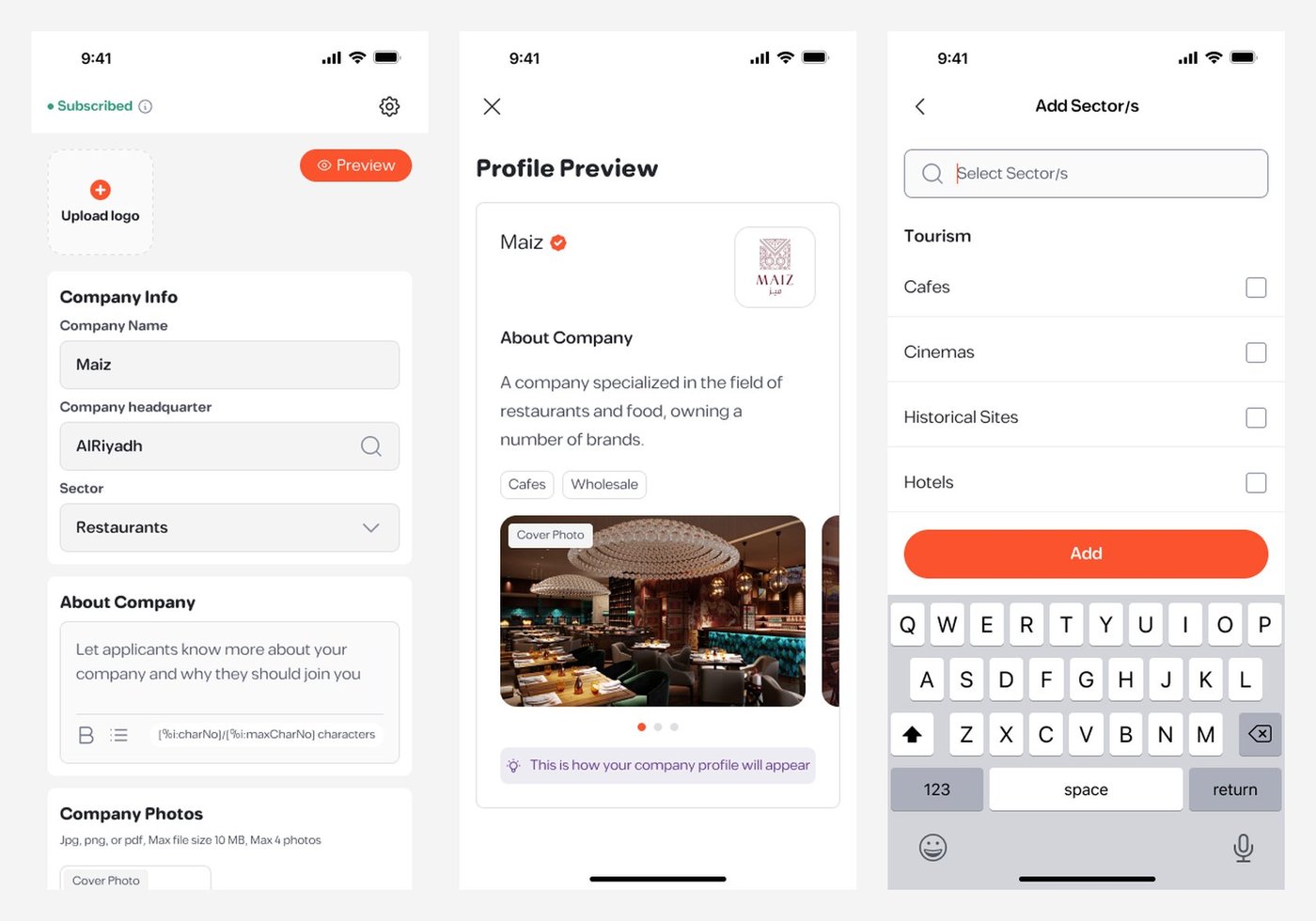
The company profile on Sabbar is a page introducing your business: logo, brand name, HQ, sectors, About and photos. It appears to job seekers with your jobs, and on your company page in the website's companies directory.
A complete profile builds applicant trust, and a job seeker who trusts you applies, replies to messages and turns up to the interview.
Where do job seekers see your profile?
- On the job page: the "About [Company]" section with the sector.
- In the photo gallery: at the top of job details in the app.
- On the job card: logo and name.
- On the company page on the website: with all your open jobs.
- In invitations and chats: your name and logo with every contact.
What are the parts of the company profile?
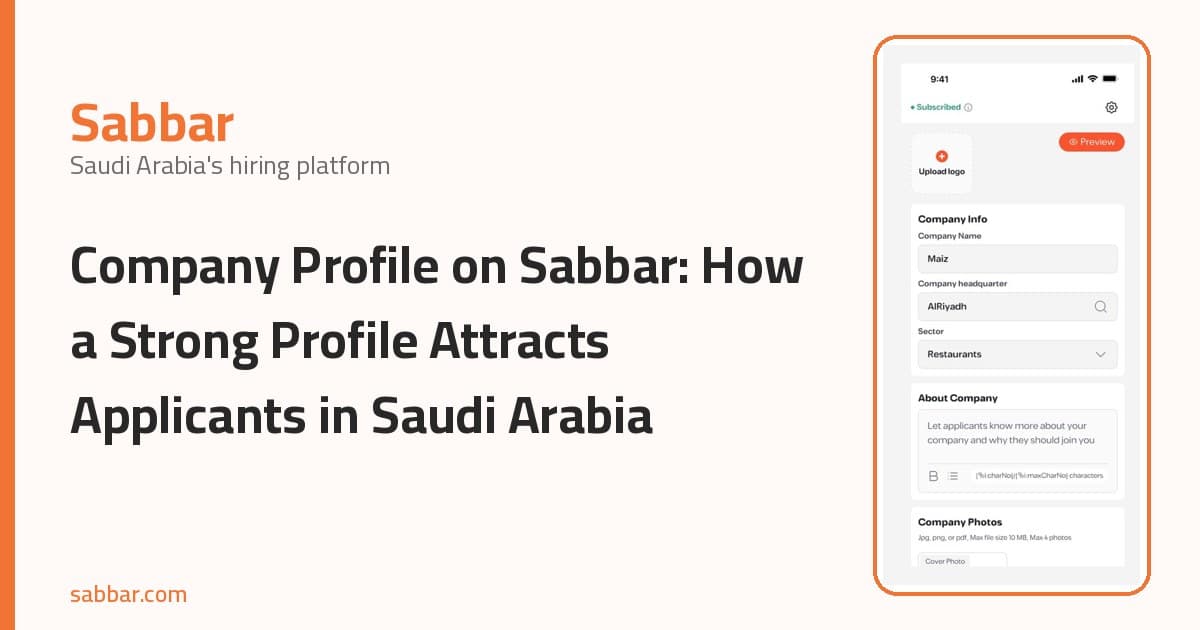
Logo
The logo is the first thing seen on a job card. Upload a clear one on a suitable background. A post with no logo looks less serious.
Brand name
Use the name people know, not the long legal name. A job seeker knows the café, not the holding entity.
HQ and headcount
The HQ city and team size give a sense of the business.
Sectors
Choose the sector or sectors you work in: restaurants, retail, services and so on.
About
A short paragraph on who you are, what you offer and why people like working with you.
Company and cover photos
Photos of the work environment and main entrance, plus a cover image at the top.
A complete profile works for you on every post. Register your company on Sabbar and set up its profile before your first job.

Sabbar is Saudi Arabia's leading local hiring platform
The go-to place for job seekers and employers across every sector in the Kingdom, with more than 1.5 million job seekers and thousands of companies
Get started with Sabbar today!
How do you write an About section that persuades?
Write three to five sentences that answer the applicant's questions.
- Who you are: "A specialty coffee chain founded in Riyadh."
- Where you are: "We have eight branches in Riyadh and Khobar."
- What you offer customers.
- What you offer employees: training, a promotion path, the work environment.
- One line that sets you apart.
Avoid generic lines such as "a leading company striving for excellence". Write things a reader can picture.
Which photos should you use?
Photos are the strongest part of the profile, because they answer "what does the place look like?".
- The store or restaurant environment: the place as an employee sees it.
- The main entrance: so the applicant recognises it on interview day.
- The team at work: with their consent.
- The work area: kitchen, till, office.
- A cover image: wide and bright.
Use real, recent photos. Generic images from the internet damage credibility.
How do you set up the profile, step by step?
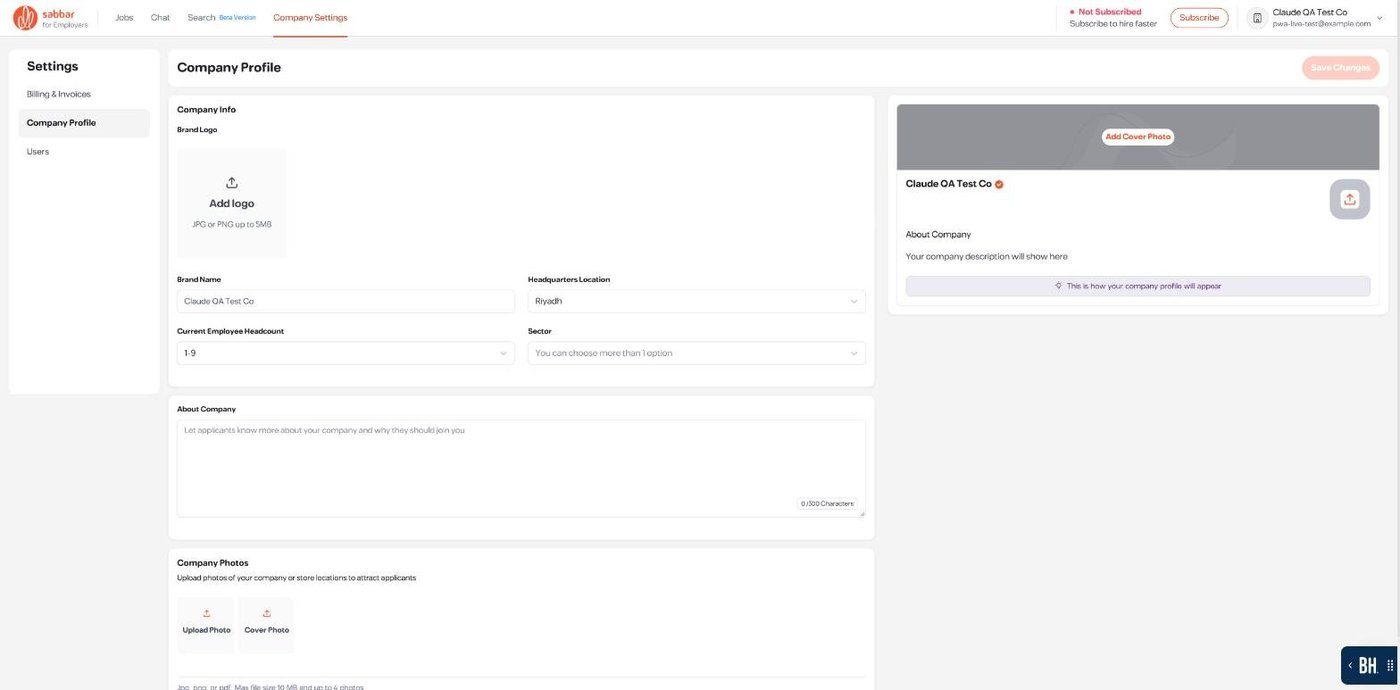
- Open Company Profile from Account in the app, or on the web platform.
- Upload the logo.
- Enter the brand name, HQ and headcount.
- Choose the sectors.
- Write the About section.
- Upload company photos and a cover.
- Tap Profile Preview to see it as a job seeker would.
How is the profile different from account activation?
They are two different things.
- Account activation: legal details Sabbar reviews before your jobs go live: legal name and Commercial Registration number, with website or social accounts optional.
- Company profile: the introductory content job seekers see: logo, About and photos.
The first proves the business is real; the second makes it attractive.
How does the profile affect hiring results?
- More applications: reassured job seekers apply.
- Better-suited candidates: people who saw the workplace and liked it.
- More accepted invitations: job seekers open your profile before replying.
- Better interview attendance: they know the place and the entrance.
- A professional image: with job seekers and customers alike.
Invitations are covered in Inviting candidates to apply.
Common mistakes in company profiles
- A cropped or blurry logo.
- An About section copied from the website in customer marketing language.
- No photos, or old ones of a branch that closed.
- A long legal name nobody recognises.
- The wrong sector, showing your jobs to the wrong people.
- A profile untouched for years.
When should you update the profile?
- When a new branch opens.
- When the brand or logo changes.
- Before a big hiring season.
- When you add new employee benefits.
- At least every six months.
What completes the company profile?
The profile is the foundation; the post itself completes it.
- A clear job description. See How to write a job description in minutes with Saud.
- Salary and shifts stated.
- Fast replies to applicants.
- For larger employers: a branded career page, as in Your company career page in Saudi Arabia.
Posting steps are in How to post a job in Saudi Arabia for free.
Profile ready? Put it to work. See Sabbar's plans and start contacting applicants to your jobs.
An illustrative example: a weak About section and a convincing one
This illustrates the difference between two About sections for the same business: a seafood restaurant in Jeddah with three branches.
Weak: "A leading company in the restaurant sector, striving for excellence and the best service for our valued customers, and looking for outstanding talent."
A sentence that fits any restaurant in any city. It does not tell the applicant where they would work, what is served, or why to choose this business.
Convincing: "A seafood restaurant that started with one branch on the Jeddah Corniche and now has three. We serve fresh fish daily, and each branch team works in two shifts. New staff are trained for two weeks before taking on their duties, and most of our supervisors started with us as floor staff."
Five things a reader can picture: the type of restaurant, where it is, its size, how the work is organised, and training and promotion. All are facts about the business, not general adjectives.
How to photograph your business with a phone
You do not need a professional photographer. You need honest, clear photos taken at the right time.
- Choose a bright time: daytime near windows, or before the rush when the place is tidy.
- Clean and clear the clutter: boxes and bags go out of frame.
- Shoot in landscape: a horizontal photo suits the cover and the gallery.
- Take four angles: the front from outside, the entrance, the work area and the customer area.
- Add a team photo: at work, with the consent of those in it.
- Avoid strong filters: applicants want to see the place as it is.
- Update the photos after any refit: or when a new branch opens.
A checklist: a complete company profile
Check your profile against this list. Every missing item is an unanswered question in the applicant's mind.
- A clear logo that is not cropped.
- The brand name as people know it.
- HQ city and headcount.
- The right sector or sectors.
- An About section of three to five sentences with specific information.
- A wide, bright cover photo.
- At least four photos of the workplace.
- Company details and Commercial Registration complete, so the account is activated.
Ten minutes are enough to fill the gaps, and the effect shows in every job you post afterwards.
One profile serves all your job posts
The company profile is not part of a single post. It is the backdrop for everything you publish.
- Every new job benefits immediately: logo, About section and photos appear with it without rewriting.
- Every invitation carries your name and logo: and the job seeker decides whether to reply based on what they see.
- Every chat starts with the company name: a complete profile makes the first message more credible.
- The company page on the website: gathers your jobs for people who search by company.
That is why updating the profile once has more effect than improving one post.
When should you update your company profile?
- A new branch or city: update the About section and photos.
- A refit or rebrand: a new logo or new interior.
- A change in team size: headcount gives a picture of the business.
- A new sector: you added another activity.
- At least every six months: a quick check that everything is still correct.
Set up your company profile and attract the right applicant
A clear logo, an honest About section and real photos of the workplace. Set up your profile once and post your job for free in front of more than 1.5 million job seekers.
Summary
Your company profile on Sabbar is what makes a job seeker trust your post: a logo, a recognisable name, a specific About section and real photos of the workplace and entrance. Set it up once, check it in preview, update it with every change, and it works for you on every job.
FAQs about the company profile on Sabbar
Is setting up the company profile free?
Yes. It is part of the company account.
Where do I edit the company profile?
In the Account tab of the Companies App, or on the web platform.
Can I see the profile as a job seeker would?
Yes, through Profile Preview.
Which photos work best?
Real photos of the work environment and main entrance, plus a clear cover image.
Is the company profile the same as account activation?
No. Activation is legal information Sabbar reviews; the profile is introductory content job seekers see.