Inviting Candidates to Apply: Reach the Right Person in Saudi Arabia Before They Apply 2027



The best candidate for your job may never have seen your post. Perhaps they were browsing another field, or opened the app yesterday and have not been back. When you invite candidates, you fix that: instead of waiting, you reach out and ask the right job seeker to discuss your job.
On Sabbar, the system recommends matching job seekers as soon as you post. This article explains how invitations work, how to choose whom to invite, and how to get positive replies.
What you will learn
- What inviting candidates means and how it differs from waiting.
- Whom Sabbar recommends and why.
- What the job seeker sees when the invitation arrives.
- Tips that raise your acceptance rate.
What does it mean to invite candidates to apply?
To invite candidates means the company sends an invitation to a job seeker who has not applied, asking them to discuss a specific job. The job seeker decides: interested, wants details, or not interested.
On Sabbar you invite from the recommended job seekers list that appears right after you post a job on the employer web platform.
Why invite instead of only waiting?
Invite because waiting alone leaves some of the right candidates off your list.
- A candidate who missed the post: dozens of ads reached them, yours did not.
- An urgent role: no time to wait a week.
- A specialism with few applicants: you need to do the looking.
- A specific location: you want someone who lives near the branch.
- The human effect: a job seeker invited by a company feels valued and replies faster.
Whom does Sabbar recommend for you to invite?
Sabbar recommends job seekers who match your job, favouring three groups.
- Active seekers: people using the app and looking right now.
- Relevant experience: people who have worked in a similar title.
- People near the job's location.
These are the same things that raise acceptance and retention. Matching is explained in Matched candidates within 24 hours.
How do you invite candidates, step by step?
- Post the job with clear requirements.
- Open the recommended job seekers list shown after posting.
- Review each profile: experience, area and skills.
- Invite the ones who fit.
- Follow the replies in your chat inbox.
Do not wait for the right candidate to find you. Post your job on Sabbar for free and see the recommended list as soon as it is live.

Sabbar is Saudi Arabia's leading local hiring platform
The go-to place for job seekers and employers across every sector in the Kingdom, with more than 1.5 million job seekers and thousands of companies
Get started with Sabbar today!
What does the job seeker see when invited?
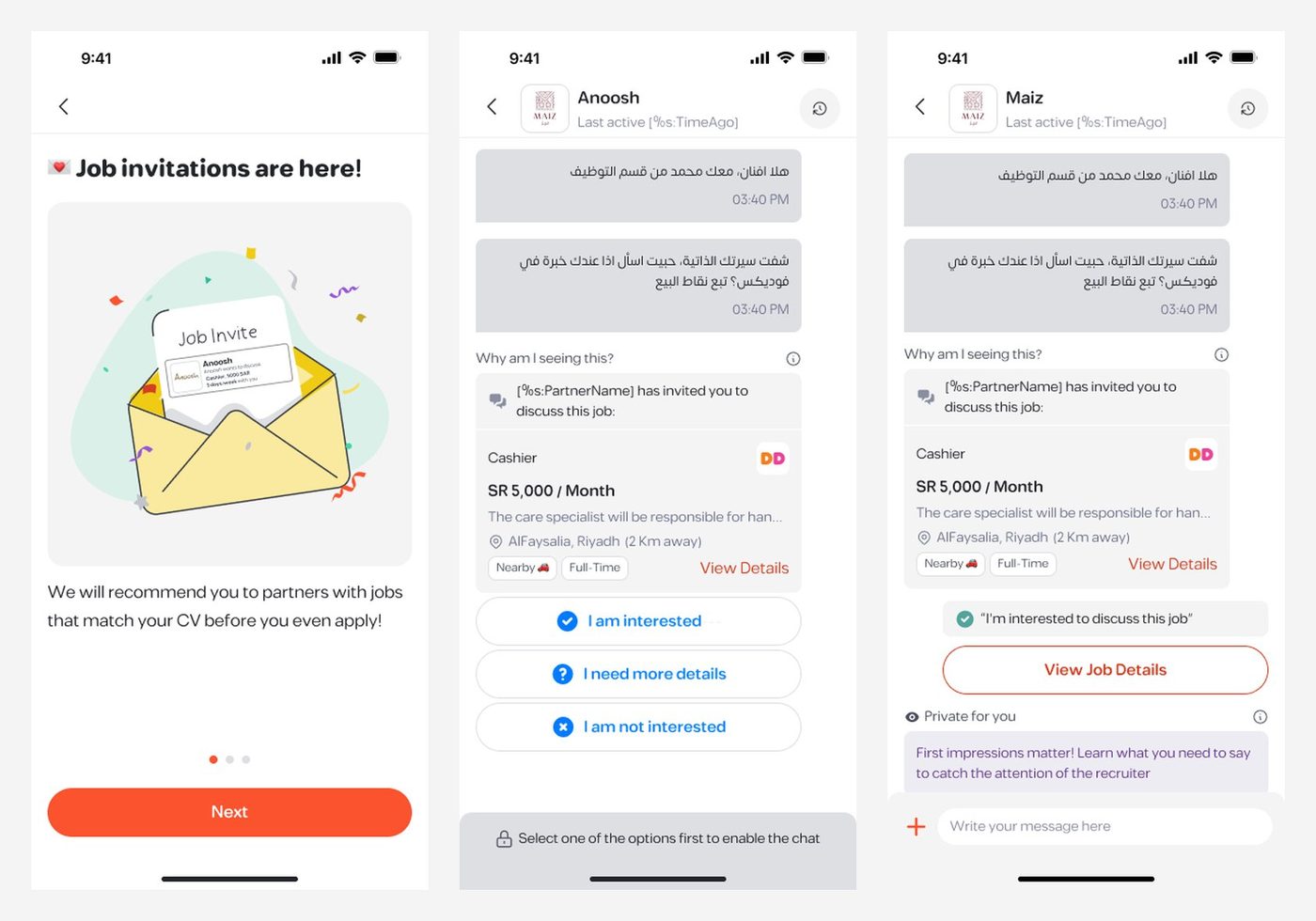
The job seeker sees the invitation in three places in their app.
- A push notification: "[Company] invited you".
- A card in chat: "[Company] has invited you to discuss this job", with the job details.
- The Job Invitations section: in the For You feed.
They have three replies:
- I am interested.
- I need more details.
- I am not interested.
Once they answer, the chat between you opens.
What do you do after the candidate replies?
Act on the reply, quickly.
- Interested: send the essentials and propose a near interview date.
- Needs details: answer clearly on salary, shifts and location.
- Not interested: send nothing and move on.
- No reply: wait two days, then focus elsewhere.
Replying within hours matters; an interested job seeker is talking to more than one company.
7 tips that raise your acceptance rate
- A complete post: job seekers open it before replying, so state salary and shifts.
- An attractive company profile: a logo, photos and an About section build trust.
- Invite nearby people first: distance is the first thing they check.
- Invite people whose experience matches: no random invitations.
- Reply fast: to "I need more details".
- Be clear in the first message: title, location, salary and hours.
- Respect their time: no documents before you agree in principle.
Posting steps are in How to post a job in Saudi Arabia for free.
How does inviting differ from Candidate Search?
Inviting starts from Sabbar's recommendations after you post. Candidate Search, in beta, starts with your keyword and filters across the CV database.
- Recommended: quick, tied to a live job, one tap.
- Search: freedom over title, district and filters, then Unlock Profile to make contact.
Use both for urgent roles. See Searching Sabbar's CV database.
Do invitations need a paid plan?
Posting the job and seeing matched applicants is free. Contacting candidates, meaning revealing details and chatting, needs a paid plan. Plans are a one-time payment with no auto-renewal.
Common mistakes when inviting candidates
- Inviting dozens of people without reading their profiles.
- A post with no salary, so everyone replies "I need more details".
- Taking two days to answer an interested candidate.
- A long first message full of conditions.
- Ignoring real applicants and relying on invitations only.
Got an "I am interested" and want to talk? Choose the Sabbar plan that fits and start the conversation today.
An illustrative example: an urgent job filled through invitations
This illustrates how to use invitations; it is not a real customer case. A dental clinic in Taif needs a receptionist within a week because the current one is leaving.
- Day one, morning: the clinic posts the job with a clear shift, salary and location.
- Right after posting: it opens the recommended job seekers, reviews the profiles, and invites twelve who have reception experience and live nearby.
- During the day: five answer "I am interested", two ask for more details, and the rest do not reply or are not interested.
- Day two: the clinic answers the seven with details and proposes interview times within two days.
- Day four: interviews are held with invited candidates and with those who applied themselves, and the decision is made.
Had the clinic waited for applications alone, it would have needed longer to gather the same number. Invitations did not replace the post. They sped up its result.
A first message after "I am interested"
A job seeker who showed interest expects a clear next step. Your first message decides whether they continue with you or with someone else.
- Thank them and name the job and branch.
- Give the basics: shift, contract type, and the salary or its range.
- Ask only two questions: when can they start, and does the location suit them?
- Propose the next step: two times for a short interview.
For example: "Thank you for your interest in the receptionist role at our clinic in Shihar. It is an evening shift from 4 to 10, on a full-time contract. When could you start, and would Sunday or Monday at 5 suit you for a meeting?"
With someone who asked for more details, answer their exact question first, then propose the next step.
How many invitations should you send, and when do you stop?
Many invitations with no follow-up are worse than a few you follow. This is a practical rule.
- Start with ten to fifteen invitations per vacancy.
- Wait one day, then review the replies.
- If fewer than three show interest, send a second batch and review the post: salary and location come first.
- Stop inviting once interested and applied candidates are enough for a shortlist of three to five.
- Do not invite people you do not intend to answer: an invitation is a promise to be in touch.
Why do some invited candidates not reply?
No reply does not mean the invitation failed. These are common reasons and what to do about them.
- No salary in the post: the job seeker cannot tell whether the job is worth their time. Write it in.
- The location is far for them: review who you invite and start with the closest.
- They found a job: normal, and outside your control.
- A vague post: the duties are unclear, so they cannot tell whether it suits them.
- Their notifications are off: they will only see the invitation when they open the app.
If the reply rate is low across several jobs, the problem is usually the post, not the candidates.
Common mistakes in inviting candidates
- Inviting everyone without reading the profile: it fills your chats with people who do not fit.
- Replying late to someone interested: interest cools within a day or two.
- A very long message: the job seeker reads it on a phone. Four lines are enough.
- Hiding something important: a hard shift or a distant location comes out later and wastes time.
- Forgetting those who asked for details: they are closer to accepting than those who never replied.
Invite the right candidate before they go elsewhere
Sabbar recommends active job seekers near your job as soon as you post it. Invite them with a tap, talk to the interested ones directly, and fill the vacancy before your competitors.
Summary
When you invite candidates on Sabbar, you take the initiative: you post, the system recommends active, nearby, experienced job seekers, you invite them, and they reply with interest or a request for details. A complete post and a fast reply turn an invitation into an interview.
FAQs about inviting candidates on Sabbar
When does the recommended list appear?
Right after you post the job on the Sabbar employer platform.
Does the job seeker know who invited them?
Yes. The invitation carries your company's name and the job details.
Can the job seeker decline?
Yes. They can choose "I am not interested" or ask for more details.
Does the chat open automatically?
It opens once the job seeker answers the invitation.
How many candidates should I invite?
Invite those whose profiles truly match your job. Quality matters more than numbers.